
Introduction
HiveJack is an internal penetration testing tool and it can be used on compromised windows machine or where you have physical access to the machine on Internal Network. This tool can be used to collect the Windows credentials from the compromised machine.
{ "@context": "http://schema.org", "@type": "HowTo", "totalTime": "PT15M", "name": "HIVEJACK", "description": "HiveJack is an internal penetration testing tool. we use this tool on compromised windows machine", "tool": [ { "@type": "HowToTool", "name": "If the Hacker get the physical access of the victim’s machine, then we can use this for Stelling all windows password credentials" }, { "@type": "HowToTool", "name": "This tool will collect three diffrernt SAM file like SYSTEM, SECURITY and, SAM" }, { "@type": "HowToTool", "name": "the victims’ machine. This data will be stored in C:/temp folder" } ], "supply": { "@type": "HowToSupply", "name": "The HiveJack tool is easy to use" }, "step": [ { "@type": "HowToSection", "name": "There is no installation for this tool, just simply download the HiveJack.ex file", "position": "1", "itemListElement": [ { "@type": "HowToStep", "image": "https://www.securitynewspaper.com/snews-up/2020/05/first-screen-min.jpg", "name": "We will see the tool in this way", "position": "1", "url": "https://github.com/Viralmaniar/HiveJack", "itemListElement": [ { "@type": "HowToDirection", "position": "1", "text": "In the above picture, we have different file dumps" }, { "@type": "HowToTip", "position": "2", "text": "In the HiveJack tool, there is no stress to remember the command" } ] }, { "@type": "HowToStep", "image": "https://www.securitynewspaper.com/snews-up/2020/05/sam-dump-min.jpg", "name": "Here, we can directly click on three files dumps, so the data automatically stores in the temp folder.", "position": "2", "url": "https://github.com/Viralmaniar/HiveJack", "itemListElement": [ { "@type": "HowToDirection", "position": "1", "text": "In the above steps we have successfully collected all three different files from the victim’s machine" } ] }, { "@type": "HowToStep", "image": "https://www.securitynewspaper.com/snews-up/2020/05/security-dump-min.jpg", "name": "now let’s check the weather the file is stored on the temp folder", "position": "3", "url": "https://github.com/Viralmaniar/HiveJack", "itemListElement": [ { "@type": "HowToDirection", "position": "1", "text": "All three files are stored in temp folder" } ] } ] }, { "@type": "HowToSection", "name": "Now, let’s copy the temp folder and past it in Kali Machine to crack the password", "position": "2", "itemListElement": [ { "@type": "HowToStep", "image": "https://www.securitynewspaper.com/snews-up/2020/05/system-dump-min.jpg", "name": "After copying with the file, go to the file path", "position": "1", "url": "https://github.com/Viralmaniar/HiveJack", "itemListElement": [ { "@type": "HowToDirection", "position": "1", "text": "type this command chntpw -I sam.save to check the password" } ] }, { "@type": "HowToStep", "image": "https://www.securitynewspaper.com/snews-up/2020/05/temp-min.jpg", "name": "Here, chntpw Main Interactive Menu ,select option one 1", "position": "2", "url": "https://github.com/Viralmaniar/HiveJack", "itemListElement": [ { "@type": "HowToDirection", "position": "1", "text": "Select the RID which we want to crack the ADMIN password" } ] } ] }, { "@type": "HowToSection", "name": "Here choose option 1 to clear user password", "position": "3", "itemListElement": [ { "@type": "HowToStep", "image": "https://www.securitynewspaper.com/snews-up/2020/05/kali-chntpm-min.jpg", "name": "In the above picture we see the BLANK password", "position": "1", "url": "https://github.com/Viralmaniar/HiveJack", "itemListElement": [ { "@type": "HowToDirection", "position": "1", "text": "So we saw the easy way to retrieve the victims password credentials in a less time. Most of the penetration testers use this tool." } ] } ] } ] }
This tool dumps SYSTEM, SECURITY and, SAM hives from the machine, which later on can be used to retrieve the list of windows username and even the password.
Environment
- OS: Microsoft Windows [Version 10.0.18363.720]
- PROCESSOR_ARCHITECTURE: AMD64
Execution Steps
- The HiveJack tool is easy to use. There is no installation needed for this tool.
- Just simply download the HiveJack.ex file and execute the tool.
- We will see the tool in this way.
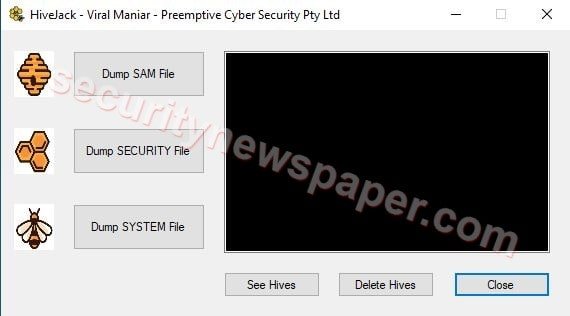
- In the above picture, we have different file dumps options.
- In the HiveJack tool, there is no stress to remember the commands.
- Here, we clicked on Dump SAM File to dump SAM file in C:\temp folder.
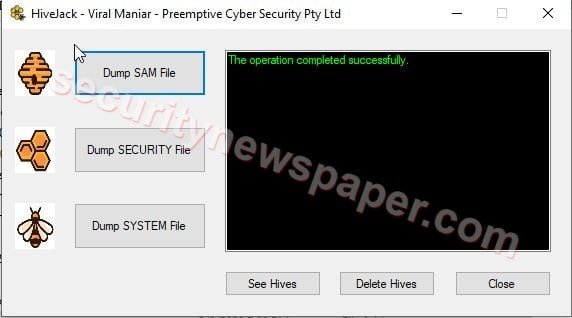
- Now click on Dump SECURITY File to dump SECURITY file in C:\temp folder.
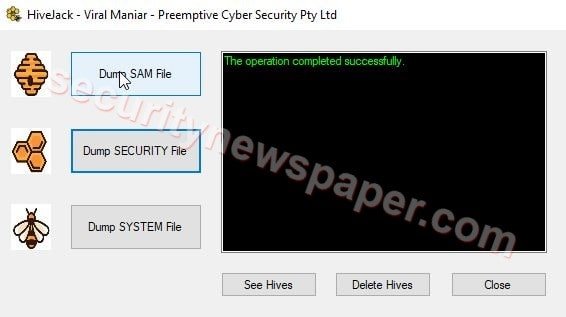
- Then click on Dump SYSTEM File to dump SYSTEM file in C:\temp folder.
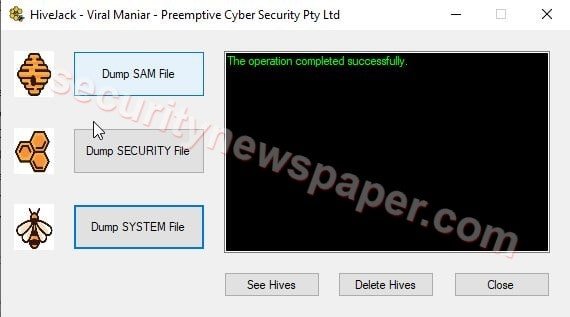
- In the above steps we have successfully collected all three different files from the Windows machine and now let’s check the files in C:\temp folder.
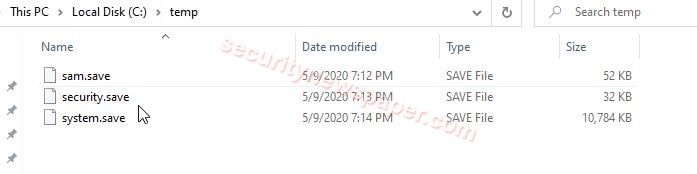
- All three files are stored in C:\temp folder.
- Now, let’s copy the temp folder to our Kali Machine to cracking the password.
- After copying with the file in Kali, go to the file path and type this command chntpw -I sam.save to retrieve the usernames in Windows machine.
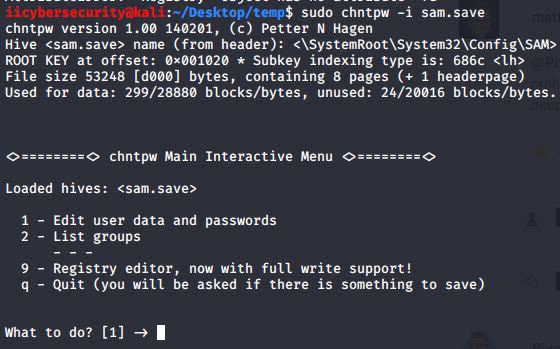
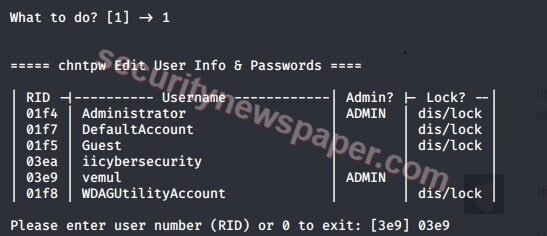
- Here, chntpw Main Interactive Menu , you can select option 1, to edit user data and password.
- So we can see that the system has iicybersecurity, vemul users other than Administrator user.
- We can also used retrieve the passwords in Windows using the steps mentioned here, Crack the Windows password with John the Ripper.
Conclusion
So we saw on the easy way to retrieve the Windows credentials in less time.









Cyber Security Specialist with 18+ years of industry experience . Worked on the projects with AT&T, Citrix, Google, Conexant, IPolicy Networks (Tech Mahindra) and HFCL. Constantly keeping world update on the happening in Cyber Security Area.