
We all want to find our old friends or colleagues. There are many social media websites, but if we search one by one, it takes a lot of time and effort. Now we can use a tool called Sherlock. It helps us search 400+ social media platforms at the same time. Sherlock works with a username. You just enter the username, and it checks around 400+ websites to see where that username exists.
This makes the process very fast and easy. With this tool, we can find profiles in a few minutes instead of hours. We can also search multiple usernames at once. But we should use this tool carefully and only for legal and ethical purposes.
Environment
- OS: Kali Linux 64 bit
Installation Steps
- Use this command to clone the file
- git clone https://github.com/sherlock-project/sherlock
root@kali:/home/iicybersecurity# git clone https://github.com/sherlock-project/sherlock
Cloning into 'sherlock'...
remote: Enumerating objects: 16, done.
remote: Counting objects: 100% (16/16), done.
remote: Compressing objects: 100% (12/12), done.
remote: Total 4485 (delta 6), reused 7 (delta 1), pack-reused 4469
Receiving objects: 100% (4485/4485), 15.30 MiB | 3.29 MiB/s, done.
Resolving deltas: 100% (2837/2837), done.
- Use cd command to enter into sherlock directory.
root@kali:/home/iicybersecurity# cd sherlock/
root@kali:/home/iicybersecurity/sherlock#
- Next, use this command to install the requirements.
- python3 -m pip install -r requirements.txt
root@kali:/home/iicybersecurity/sherlock# python3 -m pip install -r requirements.txt
Requirement already satisfied: beautifulsoup4>=4.8.0 in /usr/lib/python3/dist-packages (from -r requirements.txt (line 1)) (4.9.1)
Collecting bs4>=0.0.1
  Downloading bs4-0.0.1.tar.gz (1.1 kB)
Requirement already satisfied: certifi>=2019.6.16 in /usr/lib/python3/dist-packages (from -r requirements.txt (line 3)) (2020.4.5.1)
Requirement already satisfied: colorama>=0.4.1 in /usr/lib/python3/dist-packages (from -r requirements.txt (line 4)) (0.4.3)
Requirement already satisfied: lxml>=4.4.0 in /usr/lib/python3/dist-packages (from -r requirements.txt (line 5)) (4.5.2)
==============================================================================================SNIP=================================================================================================================================
    Found existing installation: PySocks 1.6.8
    Not uninstalling pysocks at /usr/lib/python3/dist-packages, outside environment /usr
    Can't uninstall 'PySocks'. No files were found to uninstall.
  Attempting uninstall: stem
    Found existing installation: stem 1.7.1
    Not uninstalling stem at /usr/lib/python3/dist-packages, outside environment /usr
    Can't uninstall 'stem'. No files were found to uninstall.
Successfully installed PySocks-1.7.1 bs4-0.0.1 requests-futures-1.0.0 stem-1.8.0 torrequest-0.1.0
- Use this command to find the help options, python3 sherlock -h
root@kali:/home/iicybersecurity/sherlock# python3 sherlock -help

usage: sherlock [-h] [--version] [--verbose]
                [--folderoutput FOLDEROUTPUT] [--output OUTPUT]
                [--tor] [--unique-tor] [--csv] [--xlsx]
                [--site SITE_NAME] [--proxy PROXY_URL]
                [--json JSON_FILE] [--timeout TIMEOUT]
                [--print-all] [--print-found] [--no-color]
                [--browse] [--local] [--nsfw]
                USERNAMES [USERNAMES ...]

Sherlock: Find Usernames Across Social Networks (Version 0.14.3)

positional arguments:
  USERNAMES
      One or more usernames to check with social networks.
      Check similar usernames using {?} (replace to '_', '-', '.').

optional arguments:
  -h, --help
      Show this help message and exit

  --version
      Display version information and dependencies

  --verbose, -v, -d, --debug
      Display extra debugging information and metrics

  --folderoutput FOLDEROUTPUT, -fo FOLDEROUTPUT
      Save results for multiple usernames in a folder

  --output OUTPUT, -o OUTPUT
      Save result for a single username in a file

  --tor, -t
      Use Tor for requests (slower, requires Tor installed)

  --unique-tor, -u
      Use new Tor circuit for each request (slower)

  --csv
      Create CSV file

  --xlsx
      Create Excel (xlsx) file

  --site SITE_NAME
      Search only specific site(s)

  --proxy PROXY_URL, -p PROXY_URL
      Use proxy (example: socks5://127.0.0.1:1080)

  --json JSON_FILE, -j JSON_FILE
      Load data from JSON file (local or online)

  --timeout TIMEOUT
      Set request timeout in seconds (default: 60)

  --print-all
      Show sites where username not found

  --print-found
      Show sites where username found

  --no-color
      Disable colored output

  --browse, -b
      Open results in browser

  --local, -l
      Use local data.json file

  --nsfw
      Include NSFW sites in search
- Now, use this command to view the user’s profile on all social media platforms, python3 sherlock <username>
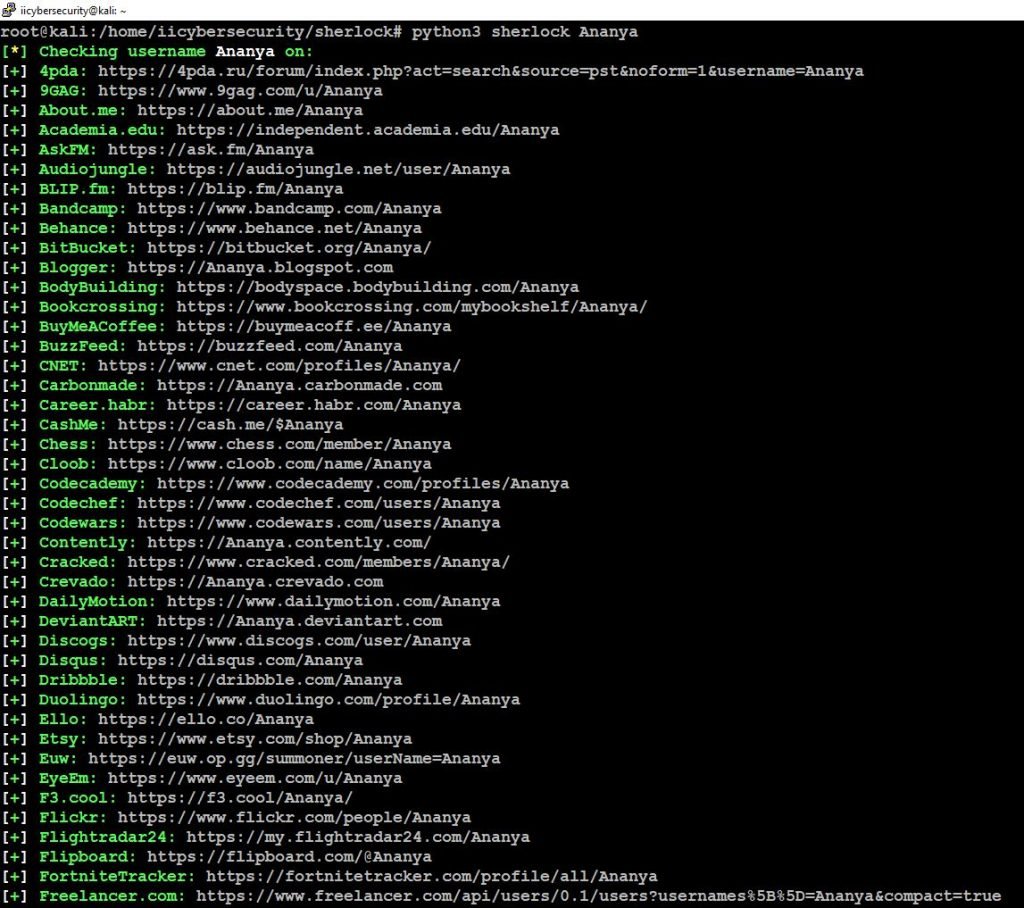
- Successfully we got the user’s profile URLs, let’s open this URL in the browser to view the user’s profile.
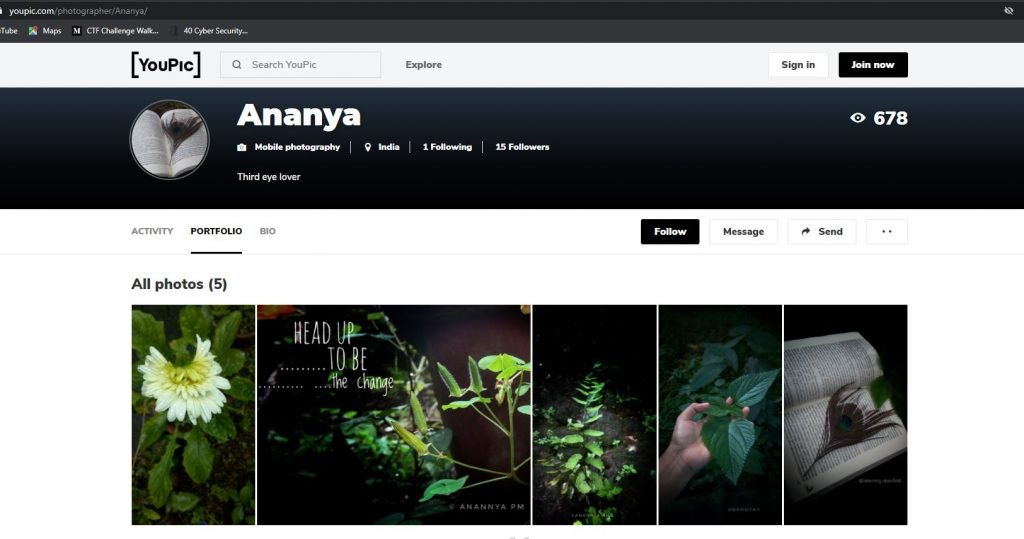
- Successfully we got the user’s profile.
- We can also search for multiple users using, python3 sherlock –site instagram ribika pooja
root@kali:/home/iicybersecurity/sherlock# python3 sherlock --site instagram ribika pooja
[*] Checking username ribika on:
[+] Instagram: https://www.instagram.com/ribika

[*] Checking username pooja on:
[+] Instagram: https://www.instagram.com/pooja
- Here, we got users profiles.
Conclusion
As we saw how this sherlock tool crawled all the social media platforms for users profile and it’s very easy for investigation purpose.









Cyber Security Researcher. Information security specialist, currently working as risk infrastructure specialist & investigator. He is a cyber-security researcher with over 25 years of experience. He has served with the Intelligence Agency as a Senior Intelligence Officer. He has also worked with Google and Citrix in development of cyber security solutions. He has aided the government and many federal agencies in thwarting many cyber crimes. He has been writing for us in his free time since last 5 years.


