
What Is a Phishing Email?
A phishing email is a fake email that looks real. Phishing is not about hacking computers. It is about fooling people. These email tries to:
- Create fear (legal action, urgent alert)
- Create urgency (act now, account blocked)
- Trick you into clicking a link or sharing data
How Attackers Send Emails
The process is very simple:
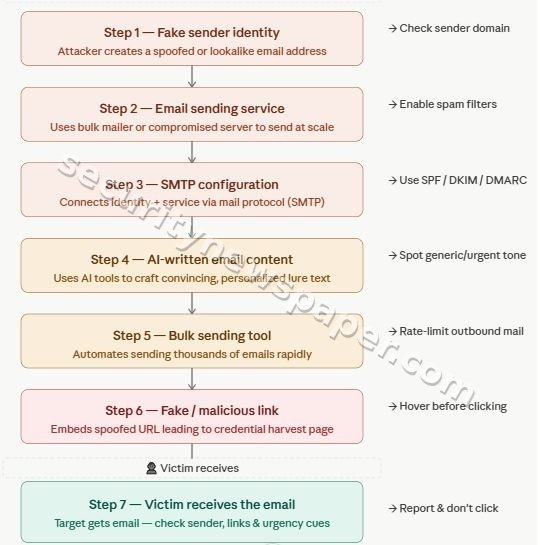
Now we will break this into clear steps.
STEP 1: Creating an Email Identity (Sender)
This is where attackers decide who the email looks like it is coming from
Option A: Simple Method (No domain needed)
They create a normal email account using:
- Gmail
- Outlook
Example:
police.alert.training@gmail.com
This option is:
👉 Easy, fast, free
👉 Used in many small attacks
Option B: Advanced Method (Buying a domain)
Attacker buy a domain from:
- GoDaddy
- Namecheap
Example:
police-alerts.com
The benefits f this option is that the sender domain:
👉 Looks more official
👉 Harder to detect
STEP 2: Setting Up Email Sending Service
Now attackers need a system to send many emails at once.
They use services like:
- Mailgun
- SendGrid
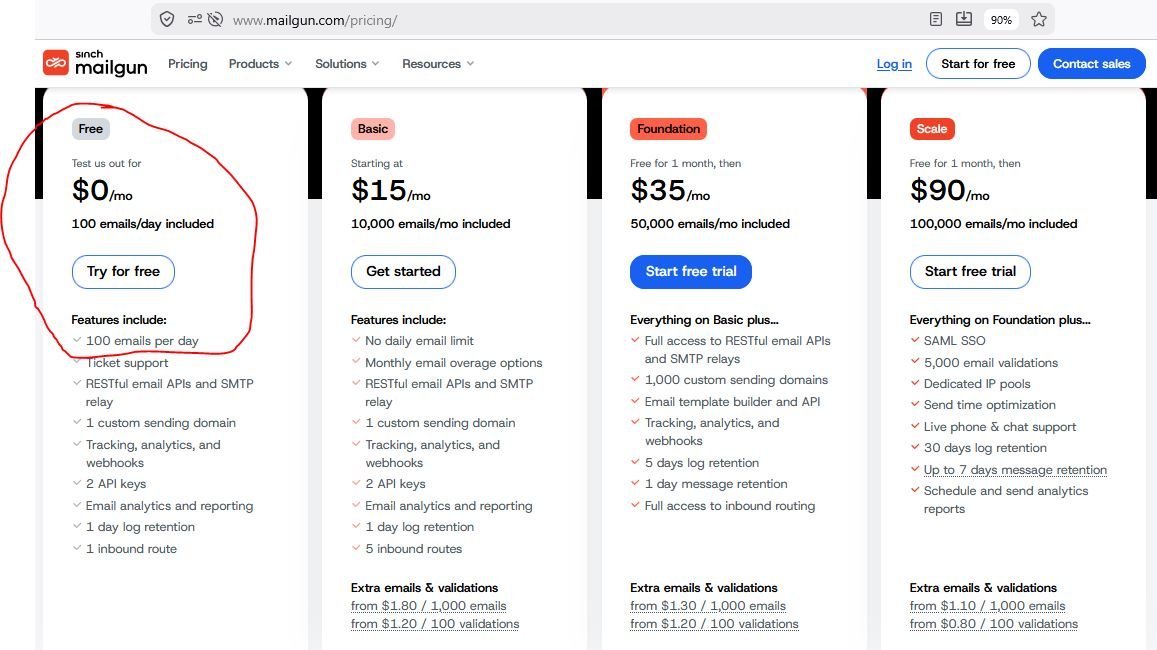
Step 2 provides the SMTP details (server, username, password) which are later used to send emails.
What they do:
- Take your email
- Deliver it to thousands of people
Also these services provide:
- Free trial (limited emails)
- Paid plans for bulk sending
A common question that can come – If attackers can create a normal email account using Gmail or get an email with a domain from GoDaddy, then why don’t they just use those to send phishing emails?
The answer is simple. Gmail and GoDaddy email services are designed for normal personal or business use, so they have strict limits on how many emails can be sent in a day. If someone tries to send a large number of emails, the account can quickly get blocked or flagged as spam. Also, emails sent this way often go directly to the spam folder, and it becomes easier to trace the sender.
Instead, attackers prefer using services like Mailgun or SendGrid because these are built for sending large numbers of emails efficiently. These platforms allow bulk sending, better delivery to inboxes, and provide automation features. In simple terms, Gmail or GoDaddy is like sending a few letters manually, while Mailgun or SendGrid is like using a system that can send thousands of letters at once. That is why attackers choose these platforms for phishing campaigns.
STEP 3: Connecting Everything (SMTP Setup)
In this step, attackers connect everything together so emails can be sent automatically. They take their email identity created in Step 1 (for example, an account on Gmail or Godaddy) and connect it with the email sending service chosen in Step 2 (such as SendGrid or Gmail itself). This connection is done using something called SMTP (Simple Mail Transfer Protocol). In simple terms, SMTP means the login details that allow sending emails.
To do this, they use:
- Server address
- Username
- Password
These details are entered into a tool like GoPhish. Once connected, the tool gets permission to send emails using that account. Without this step, emails would have to be sent one by one manually, which is slow. After this step, attackers can send many emails at once automatically. In simple words, SMTP is like giving access to a machine so it can send emails on your behalf.
STEP 4: Writing the Email (Using AI)
Now attackers create the email content.
They use tools like:
- ChatGPT
Example prompt:
“Write an urgent email from police asking to update bank details or check FIR copy”
With AI attackers get perfect english, official tone and no spelling mistakes. That is why this step is now more dangerous
STEP 5: Using a Tool to Send Emails
Now they use tools like:
- GoPhish
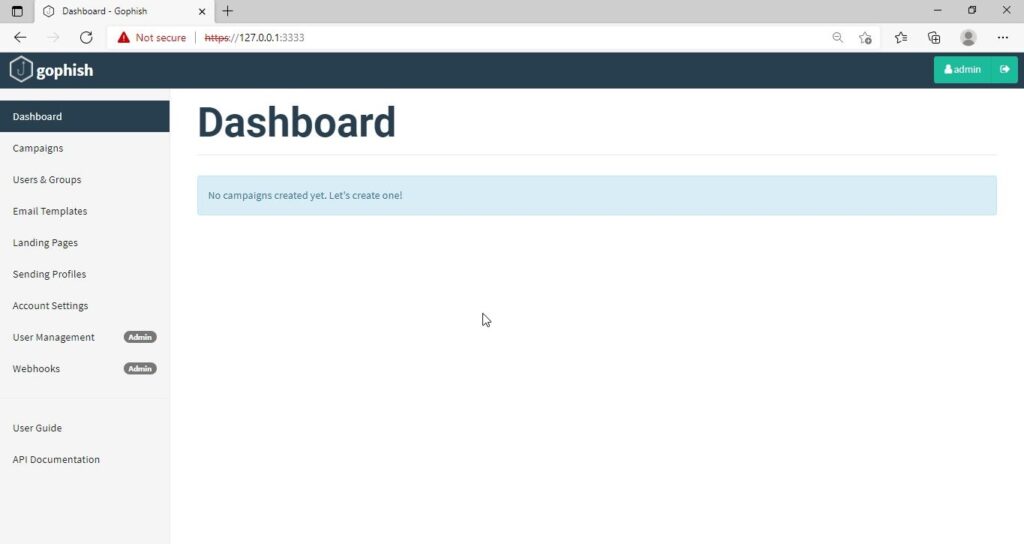
What this tool does:
- Takes the email content
- Connects to Mailgun/SendGrid
- Sends emails to many people
- It also tracks who opened the email, who clicked the email
STEP 6: Adding a Fake Link
This is the most dangerous part. Now attacker adds link to the email:
- A link (looks normal)
But goes to a fake website
Example:
Text: “Click here to open the police FIR copy or Click here to get your Parcel with police”
👉 When this link is clicked by victim or innocent user :
- Data may be stolen
- System may be infected
- Backdoor is installed
- In case email is opened on mobile phone is can do more dangerous things
STEP 7: Victim Receives the Email
Now the email reaches the victim or innocent user inbox. Email looks:
- Professional
- Urgent
- Official
👉 This is where the decision matters, it provokes victim to click on the link.
Summary
Attackers hide using:
- Fake names
- VPN (hide location)
- Foreign services
- Hacked accounts
Anyone can create email → Gmail or domain
Use services → Mailgun / SendGrid
Write email → AI tools
Send in bulk → tools like GoPhish
Trick user → fake link
👉 No advanced hacking required
“Do not trust an email just because it looks real. Always verify before clicking or responding.”






Cyber Security Researcher. Information security specialist, currently working as risk infrastructure specialist & investigator. He is a cyber-security researcher with over 25 years of experience. He has served with the Intelligence Agency as a Senior Intelligence Officer. He has also worked with Google and Citrix in development of cyber security solutions. He has aided the government and many federal agencies in thwarting many cyber crimes. He has been writing for us in his free time since last 5 years.


