
Let’s start away walk through a realistic vulnerability discovery scenario using W1nZ1p (we have changed the name to avoid any claims) as the example. The objective here is not exploitation but understanding how flaws emerge in software and how attackers discover them. Once you see the workflow you will realize why zero day protection claims from many vendors are often marketing rather than technical reality.

Below is a deep technical walkthrough using W1nZ1p as a learning model. The goal is to understand how vulnerabilities appear in real software, how researchers discover them and why they later become zero day exploits.
This explanation expands each stage with more technical inputs taken from researchers in International Institute of Cyber Security (iiCyberSecurity), examples so you can reason about defensive strategies.
1. Understanding the Software Architecture
Before finding vulnerabilities, attackers first understand how the software is architected internally. A W1nZ1p archive contains several structured components.
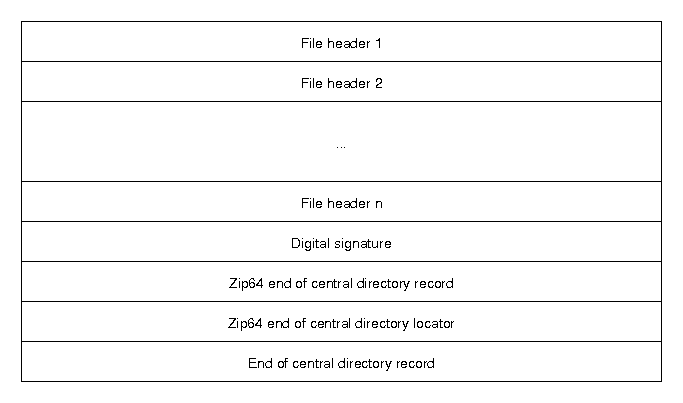
Local File Header
This header appears before every compressed file. It includes fields such as:
- Different headers
- Compression method
- File name length
- Extra field length
- CRC checksum
- Compressed size
- Uncompressed size
Example structure:
[signature]
[version needed]
[compression method]
[last modification time]
[file name length]
[extra field length]
[file name]
[extra field]
[file data]
Central Directory
This acts as the table of contents of the W1nZ1p. It stores metadata about every file in the archive and points to their offsets.
End of Central Directory Record
This marks the end of the archive and tells the program where the directory begins.
Why this matters for security
Programs like W1nZ1p must read binary values from untrusted files.
If any field is:
- too large
- negative
- inconsistent
- manipulated
the parser may behave incorrectly. This is the root of many vulnerabilities.
2. Attack Surface Mapping
Attack surface means all entry points where an attacker can influence the program. For an archive utility, attackers examine:
File Parsing
Opening a malicious ZIP file.
File Preview
Some archive tools preview images or documents inside the archive.
Example attack:
- malicious JPEG inside ZIP
- parser crash when preview loads it
Metadata Processing
File names, directory names, comments.
Example:
../../../../Windows/System32/file.exe
This may trigger path traversal vulnerabilities.
Compression Algorithm Handling
ZIP supports multiple algorithms:
- Deflate
- BZIP2
- LZMA
Each algorithm has its own parsing logic. Every parser introduces new potential bugs.
3. Reverse Engineering the Program
If source code is unavailable, researchers study the compiled binary.
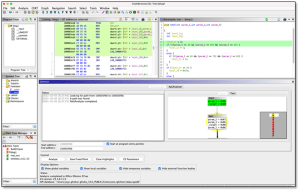
Common tools:
- Ghidra
- IDA Pro
Reverse engineering reveals:
- how ZIP headers are parsed
- how buffers are allocated
- where memory copies occur
Example logic discovered:
read header
allocate  buffer
copy filename
extract file
If validation is missing, that area becomes a high-risk target.
4. Fuzzing – The Main Discovery Technique
Modern vulnerability discovery relies heavily on automated fuzz testing. Example tool:
- American Fuzzy Lop
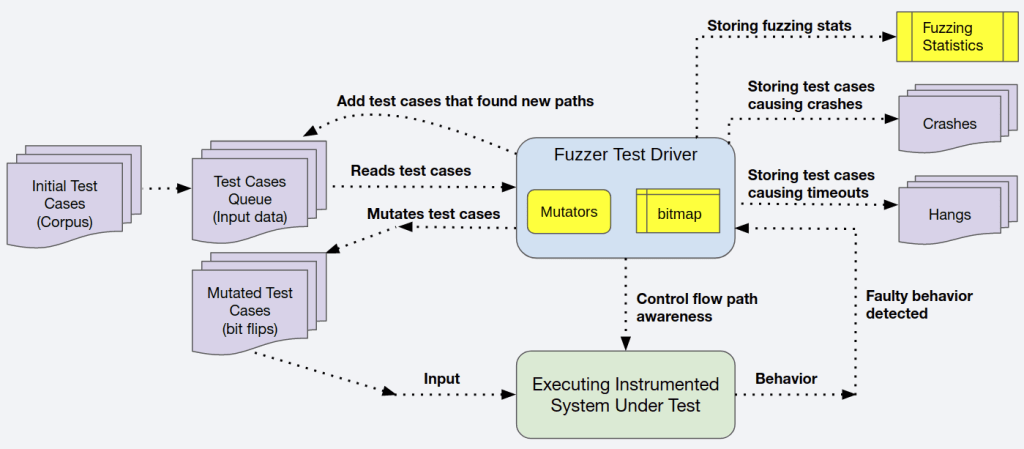
Fuzzing Workflow
- Start with a valid input file.
- Automatically mutate fields.
- Feed mutated files into the program.
- Detect crashes.
Example mutation:
Original ZIP field:
filename_length = 12
Mutated values:
filename_length = 5000
filename_length = 0
filename_length = -1
filename_length = 0xFFFFFFFF
The fuzzer sends thousands of variations per second. If the program crashes, the fuzzer stores the input that caused it.
5. Crash Analysis
Once a crash is found, researchers analyze the program state. Typical debugging tools:
- WinDbg
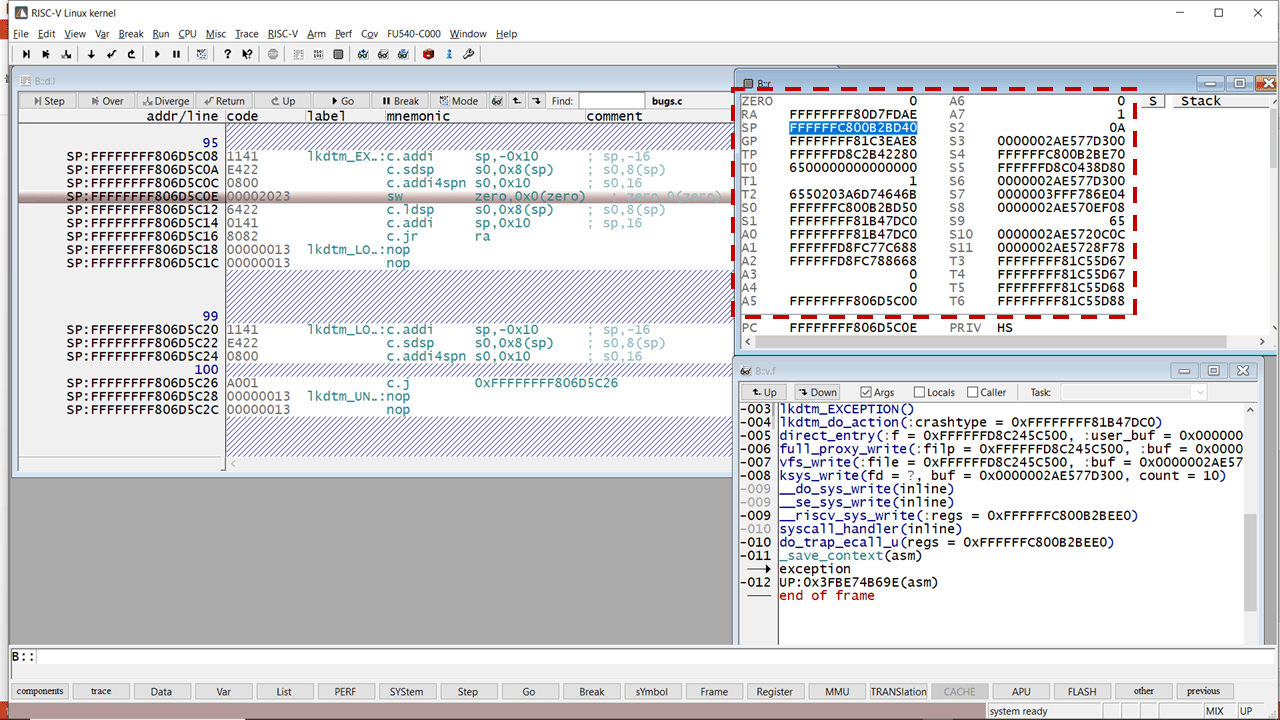
The researcher inspects:
Stack
Function calls leading to the crash.
Registers
CPU registers containing memory addresses.
Memory
Determine if attacker-controlled data overwrote memory.
Example crash:
Access violation reading location 0x414141
0x41 is ASCII A.
This indicates attacker input controlled memory.
6. Memory Corruption Vulnerabilities
Most zero-days historically come from memory corruption bugs.
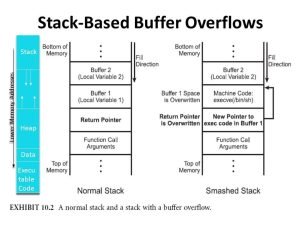
Common types:
Buffer Overflow
Writing more data than a buffer can hold.
Example:
char filename[100]
But input says:
filename_length = 300
Overflow overwrites nearby memory.
Use-After-Free
Program frees memory but continues using the pointer. This allows attackers to manipulate memory reuse.
Integer Overflow
Example:
buffer_size = filename_length + extra_field_length
If the values are extremely large, integer overflow may create incorrect memory allocations.
7. Turning a Bug Into an Exploit
Finding a bug is only step one. Turning it into an exploit is much harder.
Exploit stages typically include:
Trigger the Vulnerability
Open malicious ZIP.
Gain Memory Control
Overwrite pointers or return addresses.
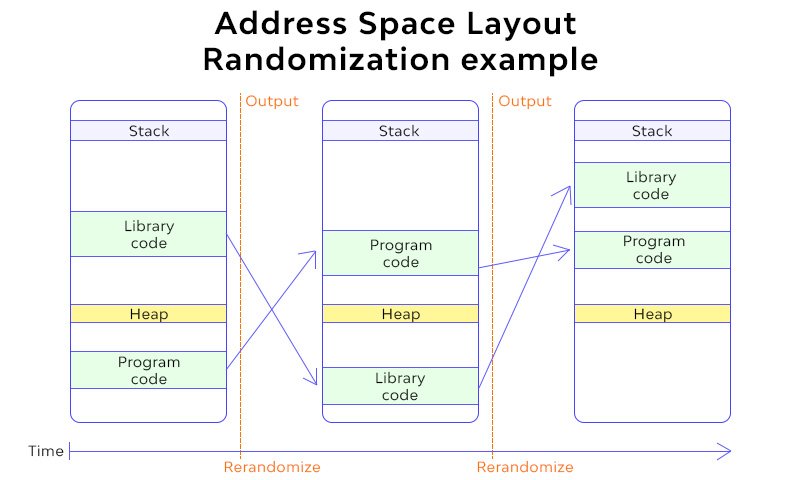
Bypass Mitigations
Modern OS protections include:
- ASLR (random memory layout)
- DEP (non-executable memory)
- stack canaries
Attackers must bypass these.
Execute Payload
Payload may:
- download malware
- spawn shell
- escalate privileges
8. Real-World Example: Zip Slip
A well-known archive vulnerability class.
Malicious ZIP entry:
../../../../Windows/System32/evil.dll
If extraction code does:
extract(base_directory + filename)
The file escapes the intended directory. This vulnerability has affected dozens of archive libraries.
9. Why Zero-Days Exist in the First Place?
Fundamental reasons:
Unsafe Programming Languages
Many legacy programs use C/C++, which allow raw memory access.
Complex Formats
ZIP format has decades of backward compatibility.
Developer Assumptions
Developers assume input follows the specification.
Attackers deliberately violate those assumptions.
Insufficient Edge Testing
Edge cases rarely covered during QA.
10. Why Security Products Cannot Fully Stop Zero-Days
Security tools such as:
- CrowdStrike Falcon
- Microsoft Defender for Endpoint
do not know the vulnerability beforehand. Instead they monitor behavioral indicators:
- unusual memory execution
- shellcode patterns
- suspicious process spawning
- abnormal privilege escalation
This is post-exploitation detection, not vulnerability prevention.
11. Strategic Insight for a Security Architect
The real defensive mindset is, assume vulnerabilities exist everywhere.
Focus on:
- sandboxing risky parsers
- least privilege
- behavior monitoring
- rapid patching
- application isolation








Cyber Security Researcher. Information security specialist, currently working as risk infrastructure specialist & investigator. He is a cyber-security researcher with over 25 years of experience. He has served with the Intelligence Agency as a Senior Intelligence Officer. He has also worked with Google and Citrix in development of cyber security solutions. He has aided the government and many federal agencies in thwarting many cyber crimes. He has been writing for us in his free time since last 5 years.


