
Introduction
FBI (Facebook Information) is an OSINT (open source investigation) tool. We will use this tool to retrieve the details of our facebook friend’s like mobile number, email address, others. This tool directly connected to Facebook and it comes preinstalled in CSI Linux. CSI Linux is the new linux for Cyber Forensics and Investigators. This linux is the part of the digital forensic course offered by International Institute of Cyber Security. This tool is completely built-in python programming language.
{ "@context": "http://schema.org", "@type": "HowTo", "totalTime": "PT15M", "name": "FBI - Facebook Information", "description": "FBI (Facebook Information) is a OSINT (open source investigation) tool", "tool": [ { "@type": "HowToTool", "name": "we use this tool for retrieving the details for our friends list" }, { "@type": "HowToTool", "name": "This tool is directly connected to the Facebook. It is preinstalled tool in CSI Linux analyst" }, { "@type": "HowToTool", "name": "We can find this tool at this location OSINT Online Investigation" } ], "supply": { "@type": "HowToSupply", "name": "this tool we can collect our friends Email IDs, Phone numbers" }, "step": [ { "@type": "HowToSection", "name": "in this tutorial we will explain you how to use this tool", "position": "1", "itemListElement": [ { "@type": "HowToStep", "image": "https://www.securitynewspaper.com/snews-up/2020/04/CSI-Linux-Menu-min-2-min.jpg", "name": "Go to CSI Application there we have an option called OSINT/Online Investigation, there we can see FBI tool", "position": "1", "url": "https://www.securitynewspaper.com", "itemListElement": [ { "@type": "HowToDirection", "position": "1", "text": "Type help, to find the options" }, { "@type": "HowToTip", "position": "2", "text": "Now, use this command to launch the tool" } ] }, { "@type": "HowToStep", "image": "https://www.securitynewspaper.com/snews-up/2020/04/token_LI-min.jpg", "name": "we have to generate the access token by providing username and password", "position": "2", "url": "https://www.securitynewspaper.com", "itemListElement": [ { "@type": "HowToDirection", "position": "1", "text": "we have generated access token successfully" } ] }, { "@type": "HowToStep", "image": "https://www.securitynewspaper.com/snews-up/2020/04/data-min-1.jpg", "name": "we have an option called get data. This option checks number of friends in our Facebook", "position": "3", "url": "https://www.securitynewspaper.com", "itemListElement": [ { "@type": "HowToDirection", "position": "1", "text": "This will retrieve all the phone numbers of our friends" } ] } ] }, { "@type": "HowToSection", "name": "those who added they number in Facebook", "position": "2", "itemListElement": [ { "@type": "HowToStep", "image": "https://www.securitynewspaper.com/snews-up/2020/04/new2-min-1024x703.jpg", "name": "All the data will be stored will be stored at this location", "position": "1", "url": "https://www.securitynewspaper.com", "itemListElement": [ { "@type": "HowToDirection", "position": "1", "text": ". This will retrieve all the friends Mail IDs" } ] }, { "@type": "HowToStep", "image": "https://www.securitynewspaper.com/snews-up/2020/04/Dot-min-1.jpg", "name": "In this bot we have 8 different sub classifications", "position": "2", "url": "https://www.securitynewspaper.com", "itemListElement": [ { "@type": "HowToDirection", "position": "1", "text": "lets open the Facebook and check whether, we see any request or not" } ] } ] }, { "@type": "HowToSection", "name": " All the requests are accepted", "position": "3", "itemListElement": [ { "@type": "HowToStep", "image": "https://www.securitynewspaper.com/snews-up/2020/04/friend-min-1.jpg", "name": "As we saw the above steps for retrieving our friend’s data by using social network site", "position": "1", "url": "https://www.securitynewspaper.com", "itemListElement": [ { "@type": "HowToDirection", "position": "1", "text": "we can also use github deposit tree URL" } ] } ] } ] }
Environment
- OS: CSI Linux Analyst
- Kernel version: 5.3.0-26 – generic
- Steps to Install CSI Linux: Click Here
Tool Execution Steps:
- Go to CSI Application Menu, there we have an option called OSINT/Online Investigation, there we can see FBI tool
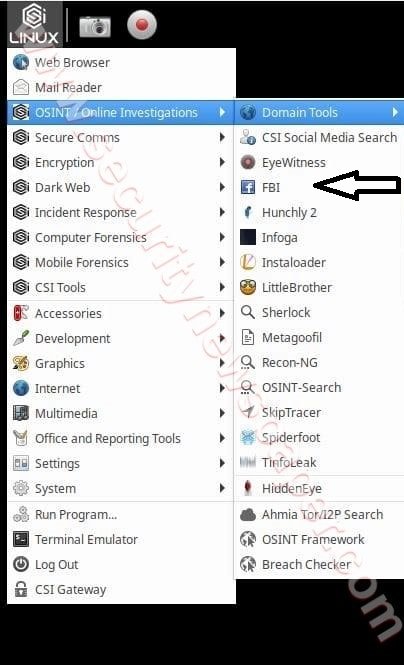
- Click on FBI option.
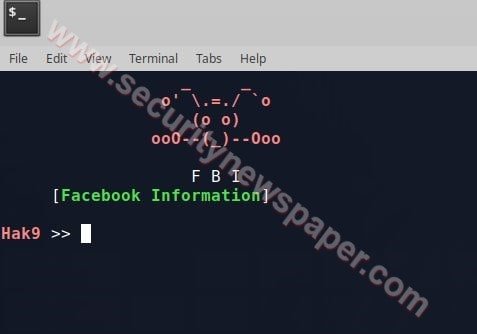
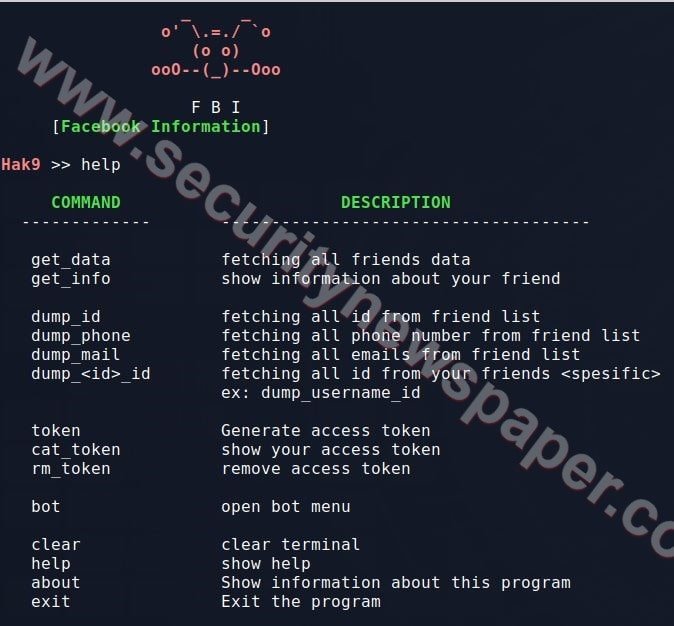
- Type help, to find the options.
- Next, we have to generate the access token by providing username and password.
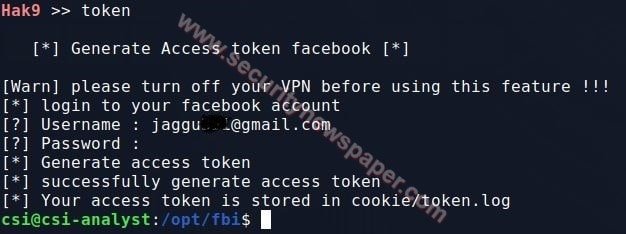
- Here, we generated an access token successfully.
- Now we will use option called to get_data. This option checks the number of friends in our Facebook.
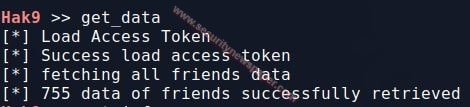
Retrieve Phone Numbers
- Now, choose an option dump_phone. This will retrieve all the phone numbers of our friends, those who added in your Facebook.
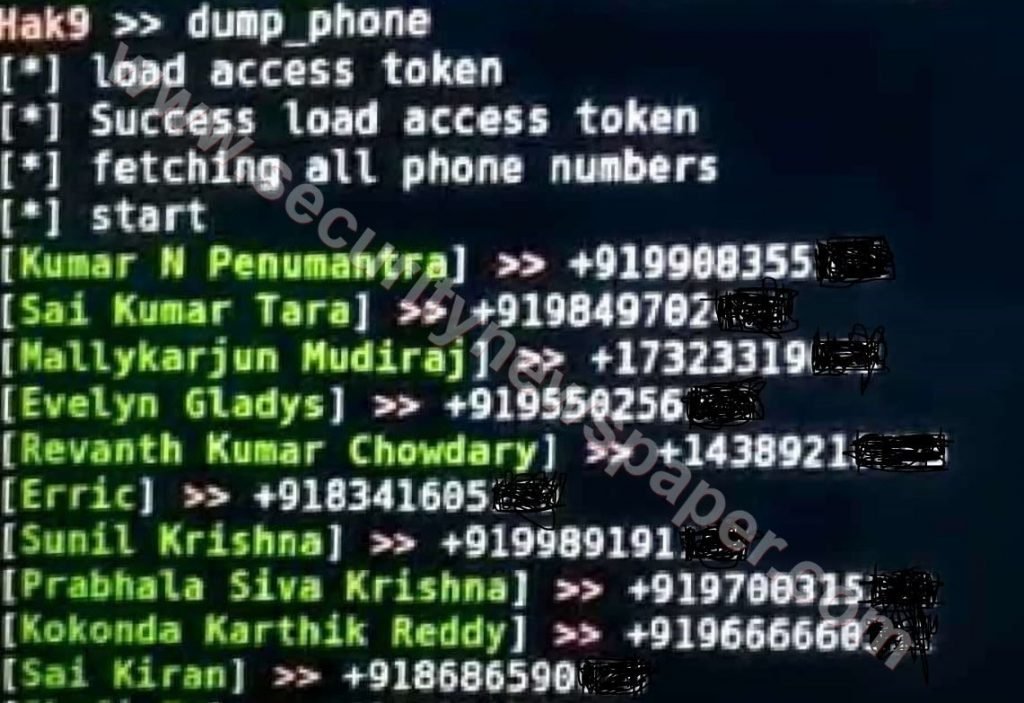
- All the data will be stored at this location /opt/output/name.txt
Retrieve Mail IDs
- Now, choose option dump_mail. This will retrieve all the friend’s Mail IDs
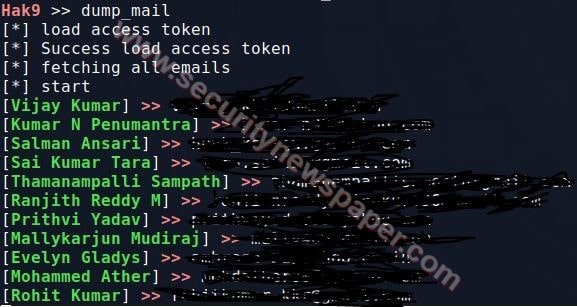
- All the data will be stored at this location /opt/output/name.txt
BOT Menu
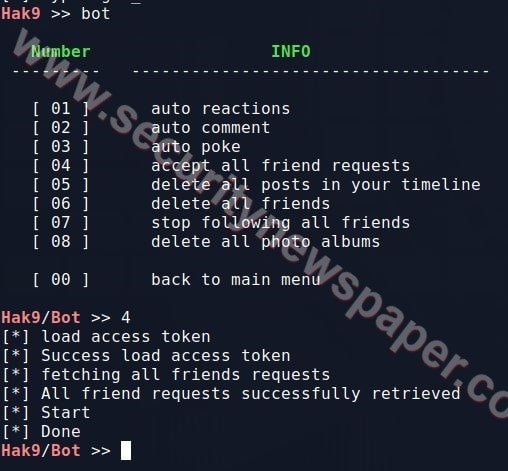
- In this tool, we have one more option, Bot. In this bot, we have 8 different sub-classifications as we can see in the below picture.
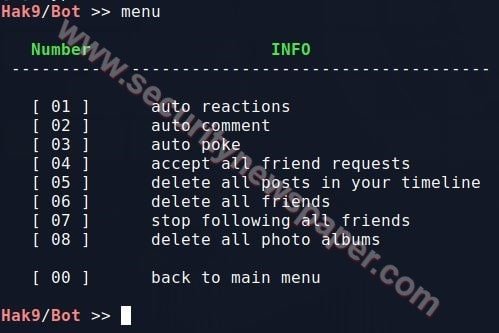
- Here, we see few options to select, an option 4 is accept all friends requests.
- Next, let’s open the Facebook and check whether we see any pending request or not.
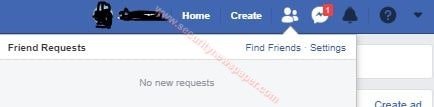
- All the requests are accepted. As we see in above picture.
Conclusion
This tool helps you control your facebook from a CLI, as we saw in the above steps wherein we retrieved our friend’s data by using social network site.








Cyber Security Specialist with 18+ years of industry experience . Worked on the projects with AT&T, Citrix, Google, Conexant, IPolicy Networks (Tech Mahindra) and HFCL. Constantly keeping world update on the happening in Cyber Security Area.