
A new cybersecurity tool is creating serious concern among IT and security teams. Unlike ransomware, this tool does not encrypt files, delete data, or install malware. Instead, it abuses a normal Windows feature to lock files so employees and applications cannot open them. The dangerous part is that even a normal domain user with basic read access can potentially disrupt access to thousands of company files within minutes.
How this tool works
Windows has a normal feature called CreateFileW. Many regular programs like Microsoft Word use it every day to open files. This tool abuses this normal Windows feature. When a file is opened in something called exclusive mode, Windows blocks everyone else from opening that file until it is released.
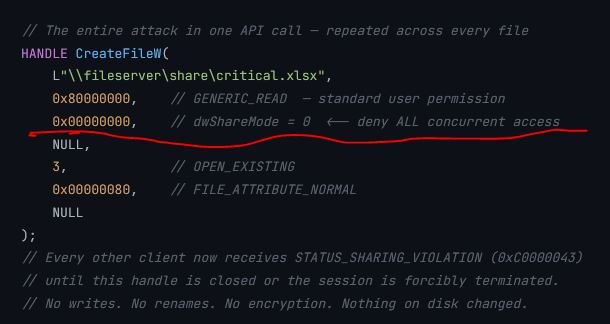
This tool exploit above underlined flag in CreateFileW. When dwShareMode = 0, Windows locks the file for exclusive use. After that, if another user, application, or network client tries to open the same file, Windows immediately blocks the request and shows a STATUS_SHARING_VIOLATION error.
The attacker uses this feature to:
- Open thousands of files at the same time
- Lock them in exclusive mode
- Prevent employees and business applications from accessing them
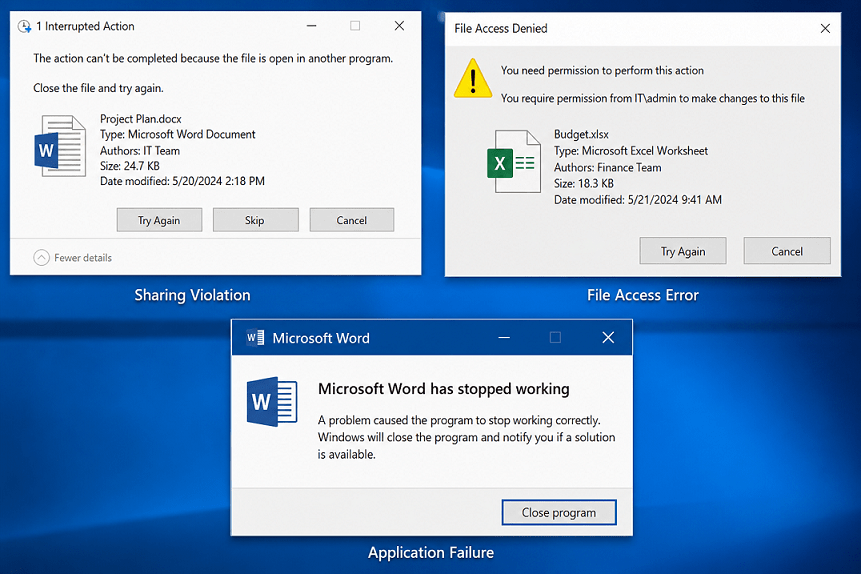
Users then start seeing errors like:
- “File is being used by another process”
- “Access denied”
- “Sharing violation”
Why This Is Dangerous
- Traditional ransomware usually:
- encrypts files,
- changes extensions,
- creates massive file modifications,
- and generates obvious security alerts.
This tool does none of these.
According to the research:
- No encryption happens
- No file modification occurs
- No admin rights are required
- No malware driver is needed
- Network traffic looks normal
To many security tools, the activity may look similar to a normal office application opening documents. This makes detection much harder.
How to install this tool:
Lab Requirements
- Windows 10 or Windows Server 2016+
- Python 3.9+
- A test SMB share
- A low-privileged domain user account
Step 1 – Download GhostLock
Clone the project from GitHub:
git clone https://github.com/kimd155/ghostlock.git
cd ghostlock
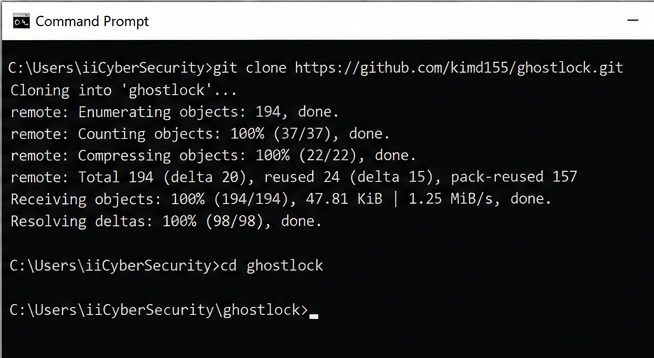
No additional packages are required.
Step 2 – Create a Test SMB Share
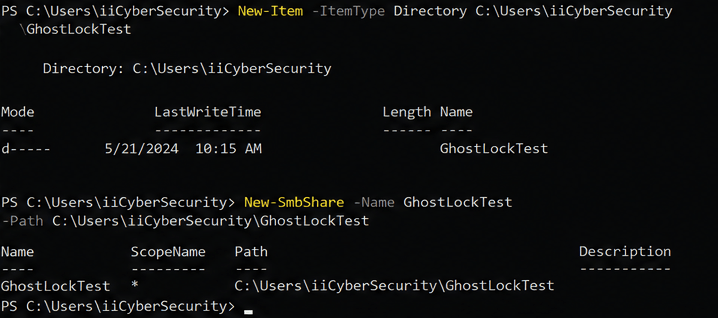
Create a test folder on a file server (powershell command):
New-Item -ItemType Directory C:\Users\iiCyberSecurity\GhostLockTest
Share the folder.
Example (powershell command):
New-SmbShare -Name GhostLockTest -Path C:\Users\iiCyberSecurity\GhostLockTest
Step 3 – Add Test Files
Place some sample files inside the folder:
- Word documents
- Excel files
- PDFs
- Text files
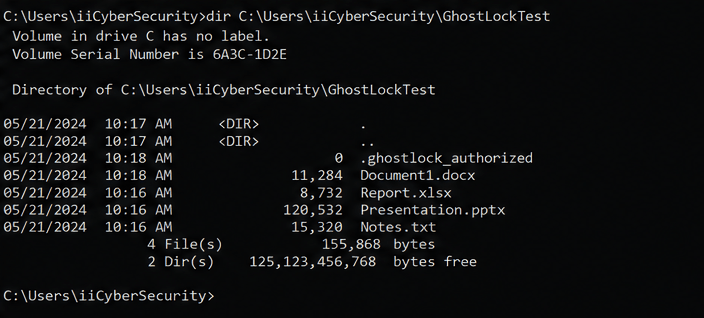
Step 4 – Create the Required Sentinel File
GhostLock requires a special authorization file before it can lock existing files.
Create it using (powershell command):
New-Item -ItemType File "C:\Users\iiCyberSecurity\GhostLockTest\.ghostlock_authorized"
This is a built-in safety feature included by the researcher. GhostLock refuses to run without it. In generated-files mode (without –existing-folder), the tool creates its own test files and never touches existing data.
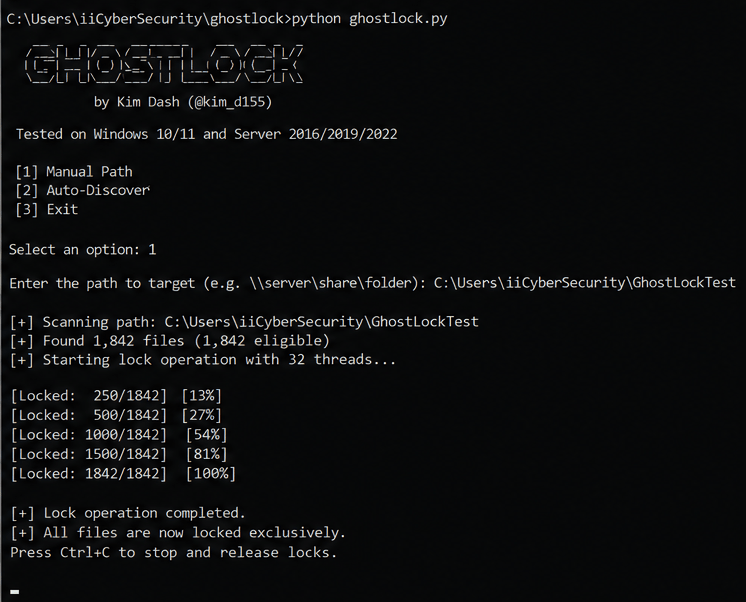
Step 5 – Run GhostLock in Interactive Mode
Start the tool:
python ghostlock.py
You will see menu options like:
[1] Manual path
[2] Auto-discover
Choose option 1 and enter the SMB share path:
\\server\GhostLockTest
in our case
C:\Users\iiCyberSecurity\GhostLockTest
The tool will:
- scan files,
- discover folders,
- and start locking files.
Step 6 – Observe the Impact
From another workstation:
- try opening files,
- edit Word documents,
- or access shared folders.
You may start seeing:
- sharing violations,
- file access errors,
- and application failures.
This demonstrates how availability disruption can happen without ransomware encryption.
Step 7 – Stop the Test
Press:
Ctrl + C
GhostLock releases all locks automatically.
No files are deleted or encrypted.
The researcher states that traditional SIEM and EDR tools may miss this attack because there are:
- no file writes,
- no encryption,
- and no suspicious extensions.
Preventive Actions for Organizations
- Limit SMB Share Access
- Monitor Open File Handles
- Create SMB Activity Baselines
- Improve SIEM Visibility
- Segment Critical File Shares
GhostLock is a reminder that attackers do not always need advanced malware or ransomware to disrupt business operations. Sometimes, abusing normal Windows behavior is enough to create major outages.






Cyber Security Researcher. Information security specialist, currently working as risk infrastructure specialist & investigator. He is a cyber-security researcher with over 25 years of experience. He has served with the Intelligence Agency as a Senior Intelligence Officer. He has also worked with Google and Citrix in development of cyber security solutions. He has aided the government and many federal agencies in thwarting many cyber crimes. He has been writing for us in his free time since last 5 years.


