Forget doom scrolling the news. There’s a dashboard on GitHub right now that turns your screen into something that looks ripped straight out of a government situation room and anyone can run it for free.
It’s called World Monitor, and it’s exactly what it sounds like: a real-time, AI-powered global intelligence dashboard that aggregates news, tracks geopolitical flashpoints, and monitors infrastructure across the entire world, all in one unified interface.
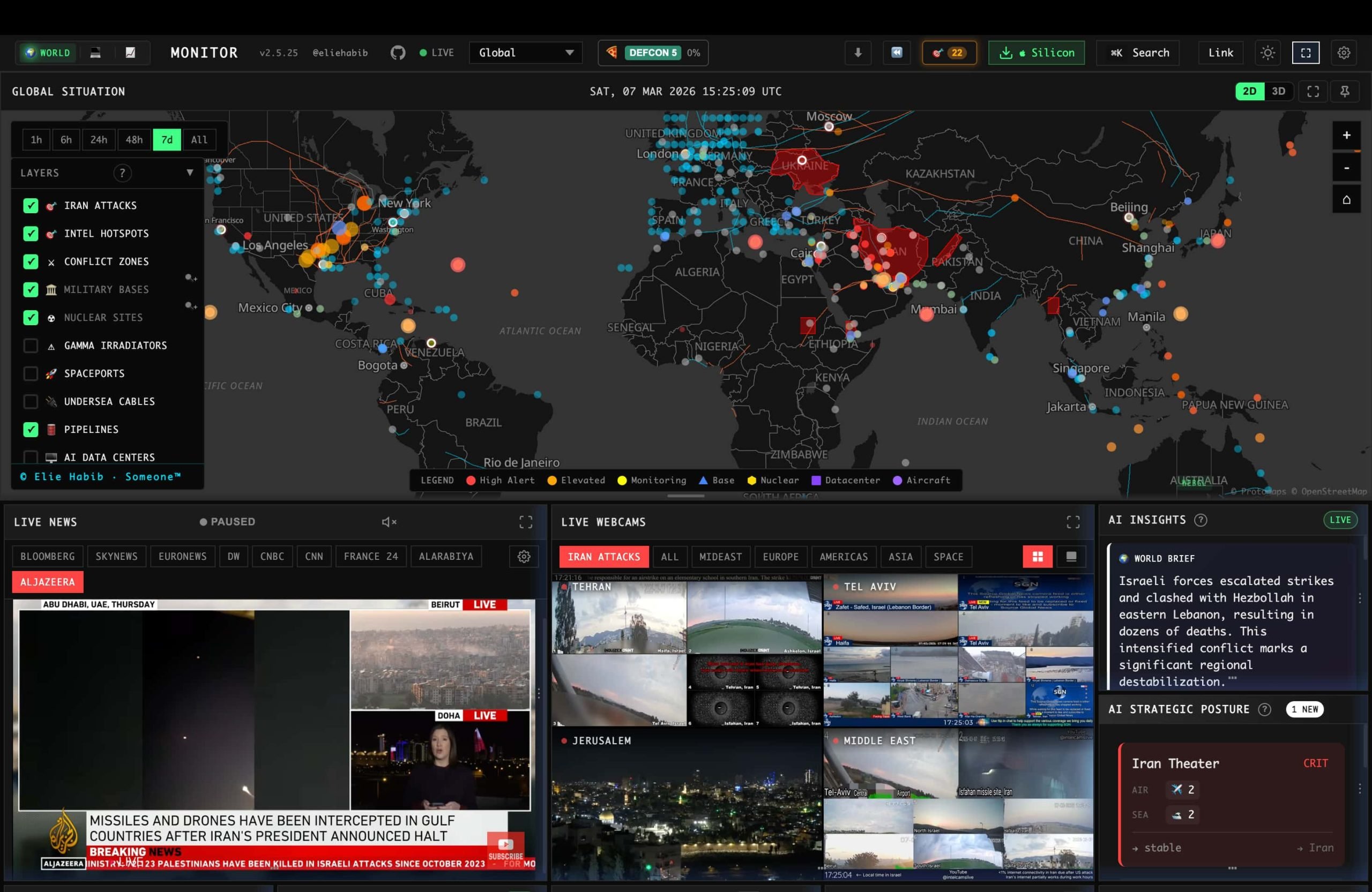
The actual dashboard – yes, it really looks like this.
So what does it actually do?
This isn’t just another news aggregator. World Monitor pulls together:
- AI-synthesized news briefs curated across global and regional categories
- A dual map engine – spin a full 3D globe or flatten it into a WebGL map, your choice
- Cross-stream correlation that flags when military, economic, disaster, and escalation signals start lining up at once
- A Country Instability Index – live, scored, and updated with roughly 24-hour movement tracking across 31 major countries
- A full finance radar covering stock exchanges, commodities, and crypto
- Even live flight-tracking data, courtesy of an ADS-B data partner
And here’s the wild part: you can run the entire thing locally with Ollama, meaning no API keys, no subscriptions, no sending your data anywhere. It’s genuinely self-hostable.
It’s not just a website
There are desktop apps for macOS, Windows, and Linux, plus themed variants of the whole platform – separate builds tuned for tech news, finance, commodities, energy, and even a “happy news only” version if the geopolitical doom is too much some days.
It also ships as a full MCP server, REST API, CLI tool, and SDKs in Python, Ruby, and Go – meaning developers and AI agents can plug directly into its data feeds and build their own tools on top of it.
How to actually install and run it
Here’s the part most “AI dashboard” hype posts leave out: this one is genuinely easy to get running yourself, in more than one way.
Option 1: Run it from source (the developer way)
If you’re comfortable with a terminal, this is the fastest path to your own live copy:
git clone https://github.com/koala73/worldmonitor.git
cd worldmonitor
npm install
npm run dev
That’s it – no environment variables required to get it running. Open localhost:3000 in your browser and you’re already looking at your own instance. Want to run one of the themed variants instead of the default “world” build? There’s a dedicated dev command for each:
npm run dev:tech       # tech.worldmonitor.app style
npm run dev:finance    # finance.worldmonitor.app style
npm run dev:commodity  # commodity.worldmonitor.app style
npm run dev:happy      # happy.worldmonitor.app style
npm run dev:energy     # energy.worldmonitor.app style
Some deeper features (certain live data feeds) need API credentials, which you can add by copying .env.example to .env.local and filling in what you want to enable — but the core dashboard works out of the box with none of that.
Option 2: Just download the desktop app
Don’t want to touch a terminal at all? There’s a native desktop app (built with Tauri) for Windows, macOS (Apple Silicon and Intel), and Linux, available straight from the project’s GitHub releases and website. One binary covers every themed variant – you install World Monitor once, then switch between world, tech, finance, commodity, energy, and happy modes right inside the app.
Option 3: Use it through the CLI, API, or as an AI agent tool
This is where World Monitor gets genuinely nerdy in a good way. It ships:
- An MCP server (
https://worldmonitor.app/mcp) so AI agents like Claude can query it directly for tools and data - A full REST API with an OpenAPI spec for developers who want raw data
- An official CLI you can try instantly with zero install:
npx worldmonitor toolsor install permanently:
npm install -g worldmonitorworldmonitor risk IR --api-key wm_xxx - Official SDKs for Python, Ruby, and Go if you want to build your own tools on top of its data
Option 4: Skip all of it and just visit the website
If you just want to look at the dashboard without installing anything, the public deployments are live and free at worldmonitor.app, plus its themed siblings: tech, finance, commodity, energy, and happy.
Who’s behind it?
The project is built and maintained by a single developer, Elie Habib, with an open contributor community behind it. It’s licensed under AGPL-3.0, meaning it’s free to self-host, fork, and even build commercial products on as long as you play by the open-source rules.
Why people are obsessed
We’re living through a stretch of nonstop geopolitical tension, market volatility, and infrastructure anxiety – and most people are stuck getting their situational awareness from fragmented headlines and doomscroll threads. World Monitor essentially hands you the kind of unified, real-time monitoring dashboard that used to be the exclusive domain of intelligence analysts and hedge funds – for free, on your own laptop.
Whether you’re a trader watching commodity swings, a researcher tracking instability indices, or just someone who wants a genuinely better way to understand what’s happening on Earth right now, this is worth a look before it inevitably gets even bigger.
Try it yourself: worldmonitor.app · GitHub repo
This article is independent commentary on a public open-source project and is not affiliated with or endorsed by World Monitor or its developers.







Cyber Security Researcher. Information security specialist, currently working as risk infrastructure specialist & investigator. He is a cyber-security researcher with over 25 years of experience. He has served with the Intelligence Agency as a Senior Intelligence Officer. He has also worked with Google and Citrix in development of cyber security solutions. He has aided the government and many federal agencies in thwarting many cyber crimes. He has been writing for us in his free time since last 5 years.