
Introduction
Finding Cross Site Scripting (XSS) vulnerabilities using different types of payloads is now easy with this XSS-LOADER tool. When performing XSS Bug Bounty projects, user tend to find online tool to encode XSS payloads. This tool has inbuilt functionally to encode XSS payloads to bypass WAF (Web Application Firewall). This tool also have a feature to scan target URL for XSS. As you know still today we can see news about XSS vulnerability in many Live Applications.
{ "@context": "http://schema.org", "@type": "HowTo", "totalTime": "PT15M", "name": "XSS – LOADER", "description": "Finding out the vulnerabilities using cross site scripting by using different type of payloads in one tool and inject the payloads in different HTML tags", "tool": [ { "@type": "HowToTool", "name": "XSS – Loader penetration testing tool. This tool finds out the vulnerabilities in html tag by using a particular payload" }, { "@type": "HowToTool", "name": "XSS – Loader is a user friendly and we can use this without any confusion, most of the penetration testers use this tool." }, { "@type": "HowToTool", "name": "Use this command to clone the file" } ], "supply": { "@type": "HowToSupply", "name": "use the cd command to enter into XSS – Loader directory" }, "step": [ { "@type": "HowToSection", "name": "use this command to install the requirements by using the command pip3 install -r requirements.txt", "position": "1", "itemListElement": [ { "@type": "HowToStep", "image": "https://www.securitynewspaper.com/snews-up/2020/05/tool-launch-min.jpg", "name": "Now, use this command to launch the tool. python3 payloader.py", "position": "1", "url": "https://github.com/capture0x/XSS-LOADER", "itemListElement": [ { "@type": "HowToDirection", "position": "1", "text": "in the above picture, we see different types of payloads to find out the vulnerability and two different scanners." }, { "@type": "HowToTip", "position": "2", "text": "Here, we have used the DVWA application for scanning the webpage." } ] }, { "@type": "HowToStep", "image": "https://www.securitynewspaper.com/snews-up/2020/05/xss-scan1-min.jpg", "name": "After we see different types of payloads to scan to find out the vulnerabilities", "position": "2", "url": "https://github.com/capture0x/XSS-LOADER", "itemListElement": [ { "@type": "HowToDirection", "position": "1", "text": "Basic Payload: In the basic payload it contains script tags." } ] }, { "@type": "HowToStep", "image": "https://www.securitynewspaper.com/snews-up/2020/05/results1-min.jpg", "name": "DIV Payload: DIV is also called divisions. This div divides HTML documents into sessions. DIV tag is just like a container it contains all the data related to the webpage.", "position": "3", "url": "https://github.com/capture0x/XSS-LOADER", "itemListElement": [ { "@type": "HowToDirection", "position": "1", "text": "Now, in the XSS -Loader tool we use DIV payload to find out the vulnerabilities." } ] } ] }, { "@type": "HowToSection", "name": "Image Payload: If we want to insert an image in the HTML page we use “IMG tag”. In this tool IMG payload to find out the image vulnerabilities on the web page.", "position": "2", "itemListElement": [ { "@type": "HowToStep", "image": "https://www.securitynewspaper.com/snews-up/2020/05/DVWA-min.jpg", "name": "Body Payload: what we see the content on the webpage that all comes under body tag. Here, we use body payload to find out the vulnerabilities in the web page.", "position": "1", "url": "https://github.com/capture0x/XSS-LOADER", "itemListElement": [ { "@type": "HowToDirection", "position": "1", "text": "SVG Payload: SVG is Scalable vector graphics. We use this to defined 2D vector-based graphic on the webpage." } ] }, { "@type": "HowToStep", "image": "https://www.securitynewspaper.com/snews-up/2020/05/dock-search-min.jpg", "name": "Here, we use SVG payload to find out the vulnerabilities in the web page.", "position": "2", "url": "https://github.com/capture0x/XSS-LOADER", "itemListElement": [ { "@type": "HowToDirection", "position": "1", "text": "Mixed Payload: we use this option to inject the payload for all the tags." } ] } ] }, { "@type": "HowToSection", "name": "Enter File Path: we use this option by specifying the payload path to scan the webpage. like /home/iicybersecurity/XSS-LOADER/img.txt", "position": "3", "itemListElement": [ { "@type": "HowToStep", "image": "https://www.securitynewspaper.com/snews-up/2020/05/webpage-min-1536x973.jpg", "name": "Here, we found a vulnerable payload in the scan. Now let’s check the URL in our search engines.", "position": "1", "url": "https://github.com/capture0x/XSS-LOADER", "itemListElement": [ { "@type": "HowToDirection", "position": "1", "text": "We use this dock finder to list out the vulnerable the URLs by using an XSS – loader" } ] } ] } ] }
Today we will walk through this tool installation steps and usage on how this can be used in your setup.
Environment
- OS: Kali Linux 2019.3 64 bit
- Kernel version: 5.2.0
Installation Steps
- Use this command to clone the Project.
- git clone https://github.com/capture0x/XSS-LOADER
root@kali:/home/iicybersecurity# git clone https://github.com/capture0x/XSS-LOADER
Cloning into 'XSS-LOADER'...
remote: Enumerating objects: 56, done.
remote: Counting objects: 100% (56/56), done.
remote: Compressing objects: 100% (56/56), done.
remote: Total 56 (delta 20), reused 0 (delta 0), pack-reused 0
Receiving objects: 100% (56/56), 43.78 KiB | 249.00 KiB/s, done.
Resolving deltas: 100% (20/20), done.
- Use the cd command to enter into XSS – Loader directory
root@kali:/home/iicybersecurity# cd XSS-LOADER/
root@kali:/home/iicybersecurity/XSS-LOADER#
- Use this command to install the requirements by using the command pip3 install -r requirements.txt
root@kali:/home/iicybersecurity/XSS-LOADER# pip3 install -r requirements.txt
Collecting beautifulsoup4==4.8.2 (from -r requirements.txt (line 1))
  Downloading https://files.pythonhosted.org/packages/cb/a1/c698cf319e9cfed6b17376281bd0efc6bfc8465698f54170ef60a485ab5d/beautifulsoup4-4.8.2-py3-none-any.whl (106kB)
    100% |████████████████████████████████| 112kB 710kB/s
Collecting bs4==0.0.1 (from -r requirements.txt (line 2))
  Using cached https://files.pythonhosted.org/packages/10/ed/7e8b97591f6f456174139ec089c769f89a94a1a4025fe967691de971f314/bs4-0.0.1.tar.gz
Collecting certifi==2019.11.28 (from -r requirements.txt (line 3))
  Cache entry deserialization failed, entry ignored
  Downloading https://files.pythonhosted.org/packages/b9/63/df50cac98ea0d5b006c55a399c3bf1db9da7b5a24de7890bc9cfd5dd9e99/certifi-2019.11.28-py2.py3-none-any.whl (156kB)
    100% |████████████████████████████████| 163kB 2.2MB/s
Requirement already satisfied: chardet==3.0.4 in /usr/lib/python3/dist-packages (from -r requirements.txt (line 4)) (3.0.4)
Collecting idna==2.9 (from -r requirements.txt (line 5))
  Cache entry deserialization failed, entry ignored
  Downloading https://files.pythonhosted.org/packages/89/e3/afebe61c546d18fb1709a61bee788254b40e736cff7271c7de5de2dc4128/idna-2.9-py2.py3-none-any.whl (58kB)
    100% |████████████████████████████████| 61kB 4.0MB/s
Requirement already satisfied: lxml==4.5.0 in /usr/lib/python3/dist-packages (from -r requirements.txt (line 6)) (4.5.0)
Collecting requests==2.23.0 (from -r requirements.txt (line 7))
  Cache entry deserialization failed, entry ignored
  Downloading https://files.pythonhosted.org/packages/1a/70/1935c770cb3be6e3a8b78ced23d7e0f3b187f5cbfab4749523ed65d7c9b1/requests-2.23.0-py2.py3-none-any.whl (58kB)
    100% |████████████████████████████████| 61kB 1.9MB/s
Collecting soupsieve==2.0 (from -r requirements.txt (line 8))
  Downloading https://files.pythonhosted.org/packages/05/cf/ea245e52f55823f19992447b008bcbb7f78efc5960d77f6c34b5b45b36dd/soupsieve-2.0-py2.py3-none-any.whl
Collecting urllib3==1.25.8 (from -r requirements.txt (line 9))
  Cache entry deserialization failed, entry ignored
  Downloading https://files.pythonhosted.org/packages/e8/74/6e4f91745020f967d09332bb2b8b9b10090957334692eb88ea4afe91b77f/urllib3-1.25.8-py2.py3-none-any.whl (125kB)
    100% |████████████████████████████████| 133kB 2.9MB/s
- Now, use this command to launch the tool. python3 payloader.py
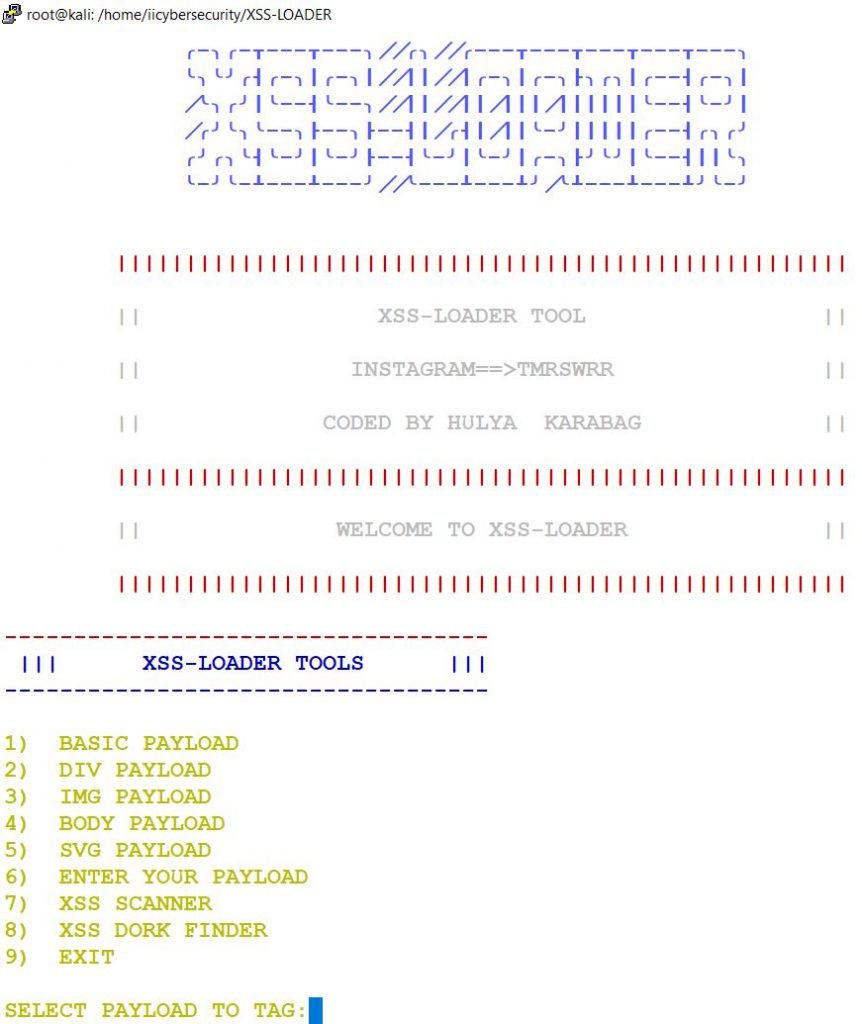
- In the above picture, we see different types of payloads to find out the vulnerability and two different scanners.
- We will select option 7 XSS Scanner.
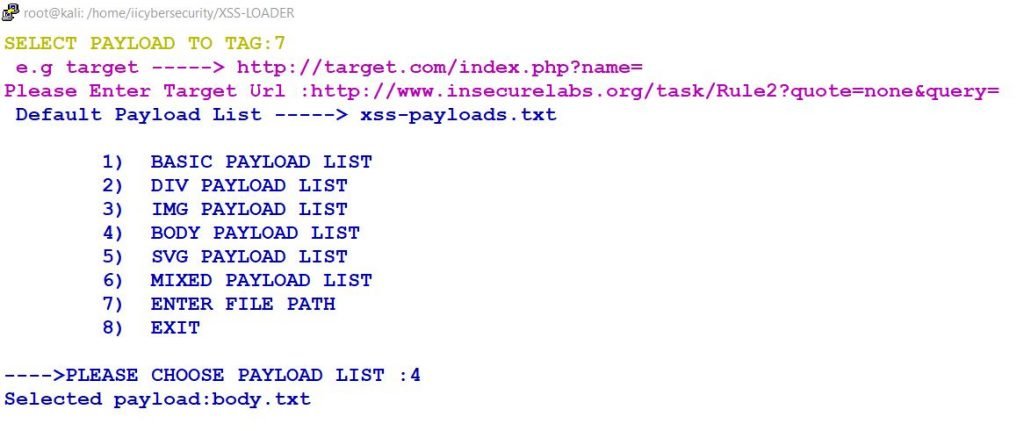
- It will prompt you to select different types of payloads. Which are:
- Basic Payload: In the basic payload it contains script tags.
- DIV Payload: DIV is also called divisions. This div divides HTML documents into sessions. DIV tag is just like a container it contains all the data related to the webpage. Now, in the XSS -Loader tool we also have DIV payload option.
- Image Payload: If we want to insert an image in the HTML page we use “IMG tag”.
- Body Payload: What we see the content on the webpage that all comes under body tag.
- SVG Payload: SVG is Scalable vector graphics. We use this to defined 2D vector-based graphic on the webpage.
- Mixed Payload: We use this option to inject the payload for all the tags.
- Enter File Path: We use this option by specifying the payload path in a file, like /home/iicybersecurity/XSS-LOADER/img.txt
- After choosing the Body Payload option, we ran the tool to find vulnerabilities in URL we specified in Target URL option, in above screen shot.
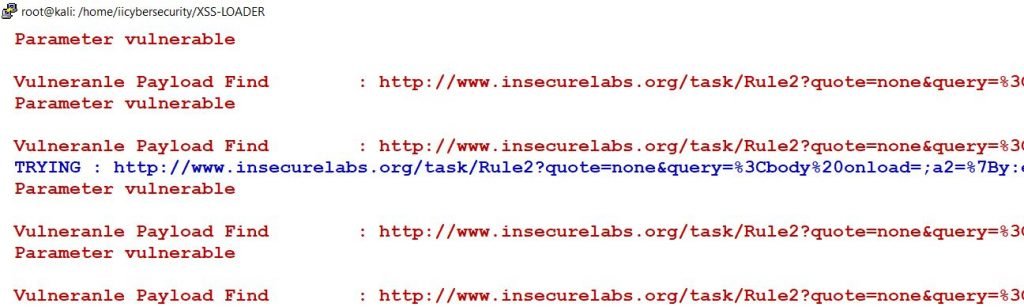
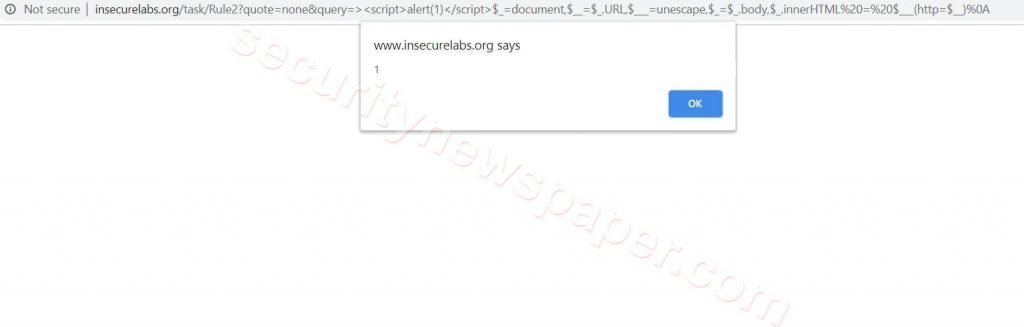
- Here, we found a XSS vulnerability in the target URL after scanning. Now let’s check the URL, by opening it in browser.
XSS Dock Finder
- We use this dock finder to list out the vulnerable pages on internet using an XSS – loader.
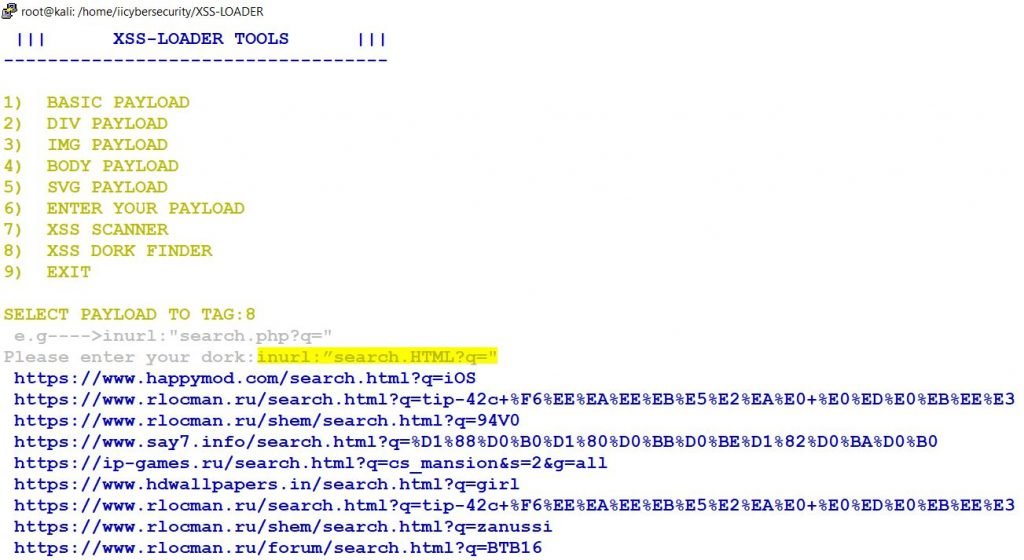
- In the above picture, we have selected an option 8 (XSS Dork Finder).
- Now, we have to enter the query like (inurl:”search.HTML?q=”) this query will list all the URLs from the internet that might be vulnerable.
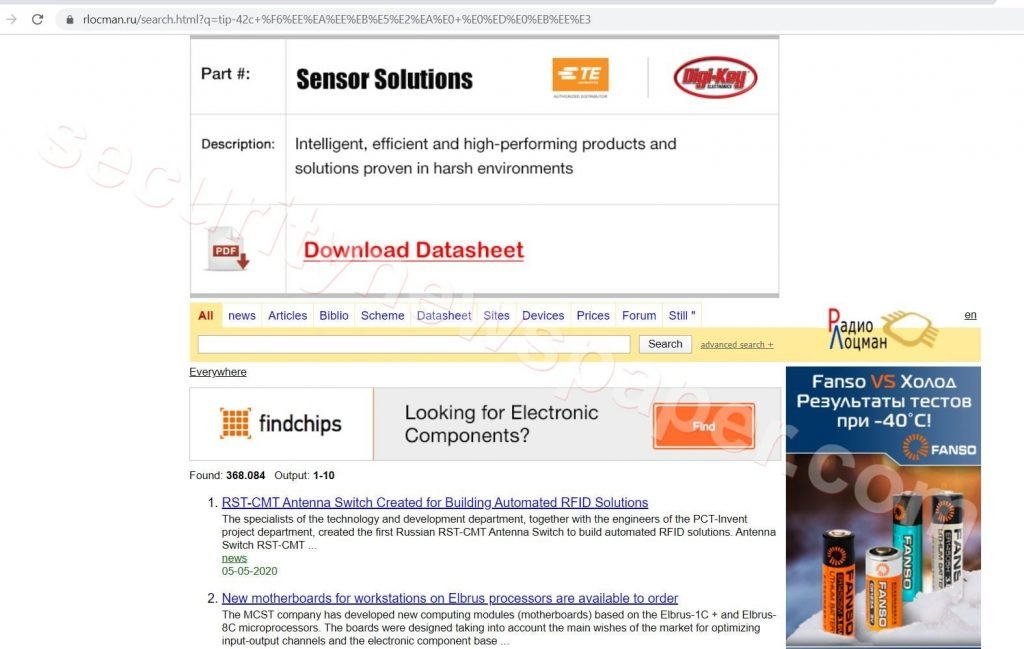
- Let’s search by selecting a particular URL.
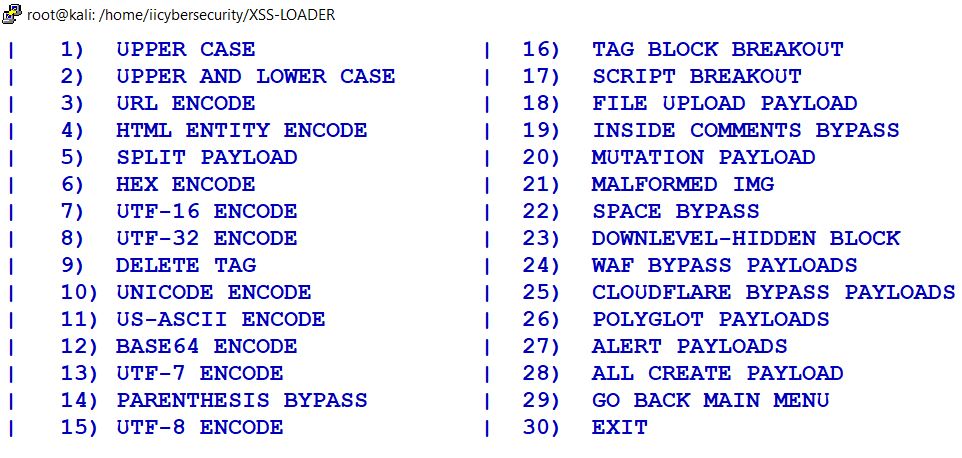
PAYLOAD ENCODER
- In this tool we have different types of Encodes, which are used to encode payloads as per their selection. These encoder can be used to bypass the WAF firewall.
Conclusion
So, we saw how to find out the vulnerable URLs and Vulnerabilities in a webpage by injecting the XSS payloads.









Cyber Security Specialist with 18+ years of industry experience . Worked on the projects with AT&T, Citrix, Google, Conexant, IPolicy Networks (Tech Mahindra) and HFCL. Constantly keeping world update on the happening in Cyber Security Area.