Imagine using your phone from your computer screen, with your mouse and keyboard. No app to install on the phone. No account. No ads. No cost.
What Is scrcpy?
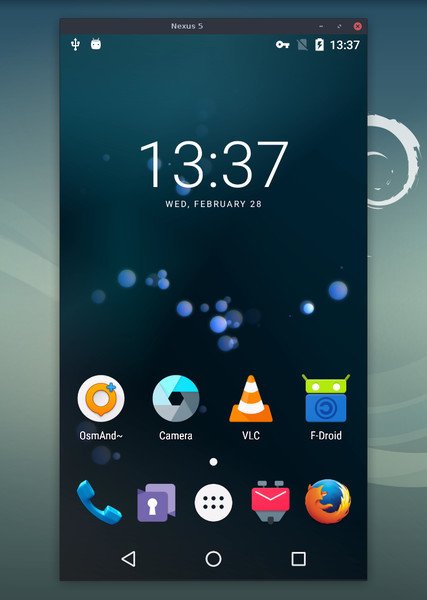
Scrcpy is a free, open-source tool made by Genymobile. It shows your Android phone’s screen on your computer and lets you control it with your mouse and keyboard. It works on Windows, macOS, and Linux.
Here is why people love it:
- No root needed. You don’t have to modify your phone.
- Nothing is installed on the phone. Nothing is left behind.
- Very fast. It has about 35 to 70 ms of delay and runs at 30 to 120 FPS.
- Starts in about 1 second.
- No internet, no account, no ads.
Cool Things It Can Do
- Mirror your screen with sound (Android 11 and above)
- Record your phone screen to a video file
- Use your phone camera as a webcam (Linux only)
- Copy and paste text between phone and PC
- Mirror with the phone screen turned off
- Use a gamepad to play games
- Connect over Wi-Fi instead of a cable
How to Install It
1. Prepare your phone (once)
- Open Settings → About phone and tap Build number 7 times to unlock Developer options.
- Open Settings → Developer options and turn on USB debugging.
- On some Xiaomi phones, also turn on USB debugging (Security Settings) if you want to use the mouse and keyboard.
2. Install scrcpy
Windows
- Go to the official releases page and download the Windows zip (win64 for most PCs).
- Unzip it to a folder, such as
C:\scrcpy. - That folder already includes
adb, so you don’t need to install anything else.
macOS
brew install scrcpyThis also installs adb as a dependency. If you don’t have Homebrew, get it from brew.sh first.
Linux (Debian/Ubuntu)
sudo apt install scrcpyThe version in the repositories may be old. For the latest one, follow the official Linux guide.
3. Run it with a USB cable
- Plug your phone into the PC.
- Tap Allow on the “Allow USB debugging?” prompt on your phone. Tick “Always allow” if it’s your own computer.
- Run scrcpy:
- Windows: double-click
scrcpy.exe, or open the folder in Command Prompt or PowerShell and typescrcpy. - macOS/Linux: open a terminal and type
scrcpy.
- Windows: double-click
Your phone screen should appear in a window you can click and type in.
4. Run it over Wi-Fi (optional)
Your phone and PC must be on the same network. On Android 11 or newer:
- In Developer options, turn on Wireless debugging and tap Pair device with pairing code.
- In a terminal, run
adb pair IP:PORTand enter the code shown on the phone. - Run
adb connect IP:PORTusing the address shown on the main Wireless debugging screen. - Run
scrcpy.
Useful commands
- Faster on a slow PC:
scrcpy -m1024 - Record the screen:
scrcpy --record=file.mp4 - No sound:
scrcpy --no-audio - Full screen: press
Alt + Fwhile it’s running
If it doesn’t work
- “No devices found”: try another cable (some only charge), re-plug the phone, and check that USB debugging is on.
- “Unauthorized” device: unlock the phone and accept the debugging prompt.
- Mouse and keyboard don’t work (Xiaomi): enable USB debugging (Security Settings) and reboot the phone.
- Windows warns about the file: only download from the official GitHub page, and run it only if you got it from there.
⚠️ How Hackers and Bad Actors Can Misuse It
Scrcpy is not a virus. It is a legitimate tool. But any tool that can show and control a phone can be abused, so be aware:
- Shoulder-surfing at a distance. If someone gets their hands on your unlocked phone, even for a minute, they can turn on USB debugging and watch your screen live from their laptop.
- Silent access when the phone is left alone. Scrcpy can run with the phone screen off. A person with physical access could use your phone while it looks idle.
- Stolen codes and private chats. With a mirrored screen, an attacker can see OTP codes, banking apps, and messages as they appear.
- Fake download sites. Scammers copy popular tool names and hide malware inside the installer. This is exactly why the developers warn against unofficial downloads.
- Wireless exposure. If you leave wireless debugging on over public Wi-Fi, you make the door easier to find.
- Social engineering. A scammer may talk you into “enabling debugging” on a “support call” so they can see your screen.
In most of these cases, the attacker needs physical access or your permission at some point. That is your best chance to stop them.
🛡️ How to Protect Yourself
- Turn off Developer options and USB debugging when you are not using them.
- Never tap Allow on a USB debugging prompt from a computer you don’t know.
- In Developer options, use Revoke USB debugging authorizations from time to time.
- Turn off wireless debugging when you finish, and never use it on public Wi-Fi.
- Use a strong screen lock, and don’t leave your phone unlocked and unattended.
- Download scrcpy only from the official GitHub page (github.com/Genymobile/scrcpy).
- Never let a stranger on a call or chat guide you into changing phone settings.
- Keep your phone’s software updated.
Final Thoughts
Scrcpy is one of the best free tools for developers, gamers, content creators, and anyone who wants to use their phone from a big screen. Use it, enjoy it, but lock down your phone and download it from the right place.








Cyber Security Researcher. Information security specialist, currently working as risk infrastructure specialist & investigator. He is a cyber-security researcher with over 25 years of experience. He has served with the Intelligence Agency as a Senior Intelligence Officer. He has also worked with Google and Citrix in development of cyber security solutions. He has aided the government and many federal agencies in thwarting many cyber crimes. He has been writing for us in his free time since last 5 years.